


A Block Ad does not allow me to access a site. How to remove it?

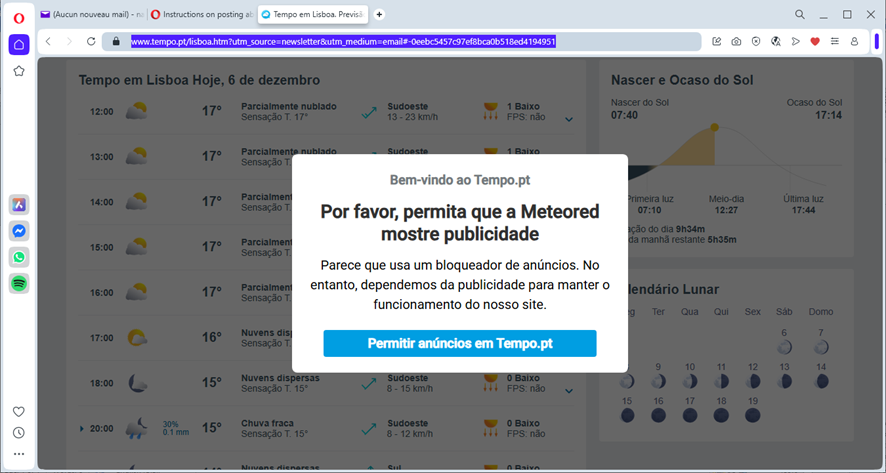
Hello. I did not receive an answer to my last help request. A Block Ad does not allow me to access this site: https://www.tempo.pt/lisboa.htm?utm_source=newsletter&utm_medium=email#-0eebc5457c97ef8bca0b518ed4194951 I need some help, please. This is a site informing me about the weather. Thank you.

選擇的解決方法
What's the blue button? Yes, I have a few ad blockers, but it still works for me. Interesting... ;-)) Tried tweaking my settings to see why it works for, but no joy. Did you try troubleshoot mode?
所有回覆 (4)
Site works for me. see screenshot Show what issue you're having. Do you have the same issue with Firefox in Troubleshoot Mode? https://support.mozilla.org/en-US/kb/diagnose-firefox-issues-using-troubleshoot-mode#w_how-to-start-firefox-in-4troubleshoot-modesf5safe-modesf
Sounds like an add-on is causing the issue, but cannot tell because I cannot see your browser. Post a similar screenshot using windows snipping tool and not the tool built into Firefox.

Thank you for your reply. I am resending another screenshot. Saying: Please allow Meteored to show advertising. Looks like you are using an advertising Ad Blocker. Allow advertising in Tempo.pt
選擇的解決方法
What's the blue button? Yes, I have a few ad blockers, but it still works for me. Interesting... ;-)) Tried tweaking my settings to see why it works for, but no joy. Did you try troubleshoot mode?
Dear all. I am sorry for my late reply. I would like to thank you all for your support. At this stage, everything is now correctly working and I really cannot tell you which of the solutions worked, since I have applied all of them. I wish you all a Merry Christmas.