


since the last update does firefox stop functioning after 1 minute with everything I do

Since the last update Firefox doesn't work properly anymore, after one minute it stalls. I did fresh up, so all my adjustments are gone. But it still stalls. I have to forceclose firefox. And can start it again. as soon as I play a youtube film it stalls again, or google agenda, I allowed pop-ups, so at least it got started, but after doeing 3 things in it firefox stalls. Can I put it back on the version before?
被選擇的解決方法
If you still want to downgrade, instructions will be provided.
Start Firefox in Safe Mode {web link} by holding down the
<Shift> (Mac=Options) key, and then starting Firefox.
A small dialog should appear. Click Start In Safe Mode (not Refresh). Is the problem still there?
https://support.mozilla.org/kb/Firefox+is+already+running+but+is+not+responding
https://support.mozilla.org/en-US/kb/firefox-slow-how-make-it-faster
https://support.mozilla.org/en-US/kb/firefox-uses-too-many-cpu-resources-how-fix
https://support.mozilla.org/en-US/kb/firefox-uses-too-much-memory-ram
https://support.mozilla.org/en-US/kb/firefox-hangs-or-not-responding
從原來的回覆中察看解決方案 👍 0所有回覆 (7)

選擇的解決方法
If you still want to downgrade, instructions will be provided.
Start Firefox in Safe Mode {web link} by holding down the
<Shift> (Mac=Options) key, and then starting Firefox.
A small dialog should appear. Click Start In Safe Mode (not Refresh). Is the problem still there?
https://support.mozilla.org/kb/Firefox+is+already+running+but+is+not+responding
https://support.mozilla.org/en-US/kb/firefox-slow-how-make-it-faster
https://support.mozilla.org/en-US/kb/firefox-uses-too-many-cpu-resources-how-fix
https://support.mozilla.org/en-US/kb/firefox-uses-too-much-memory-ram
https://support.mozilla.org/en-US/kb/firefox-hangs-or-not-responding
I reinstalled firefox, now it worked better. Busy making a newsletter, several times I changed text to headings in wordpress, no problem. the third time firefox started hanging again. It had to do with an javascriptthingy. I started firefox in savemode as you instructed and that solved this issue. How do I continue - keep starting it in save mode?
It could be the work of one of your add-ons. Type about:addons<enter> in the address bar to open your Add-ons Manager. Hot key; <Control> (Mac=<Command>) <Shift> A)
In the Add-ons Manager, on the left, select Extensions. Disable a few add-ons, then Restart Firefox.
Some added toolbar and anti-virus add-ons are known to cause Firefox issues. Disable All Of them.
If the problem continues, disable some more (restarting FF). Continue until the problem is gone. After, you know what group is causing the issue. Re-enable the last group ONE AT A TIME (restarting FF) until the problem returns.
Once you think you found the problem, disable that and re-enable all the others, then restart again. Let us know who the suspect is, detective.
I do not have any add-ons active right now.
Try disabling graphics hardware acceleration in Firefox. Since this feature was added to Firefox it has gradually improved but there are still a few glitches.
You will need to restart Firefox for this to take effect so save all work first (e.g., mail you are composing, online documents you're editing, etc.,) and then perform these steps:
In Firefox 54 and below:
- Click the menu button
 and select Options (Windows) or Preferences (Mac, Linux).
- Select the Advanced panel and the General tab.
- Uncheck Use hardware acceleration when available.
- Close Firefox completely and then restart Firefox to see if the problem persists.
In Firefox 55 and above:
- Click the menu button and select Options (Windows) or Preferences (Mac, Linux).
- Select the General panel.
- Under Performance, uncheck Use recommended performance settings. Additional settings will be displayed.
- Uncheck Use hardware acceleration when available.
- Close Firefox completely and then restart Firefox to see if the problem persists.
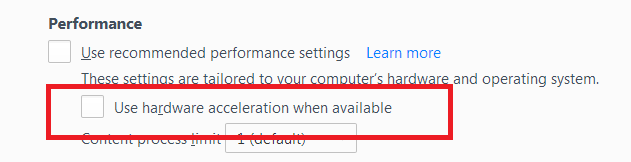
Did this fix your problems? Please report back to us!
If the problem is resolved, you should check for updates for your graphics driver by following the steps mentioned in these Knowledge base articles:
Thank you.
Thanks for your patience and your prompt replies. I checked on my graphic driver, there was no newer driver available. I disabled the hardware acceleration and tried a website that gave me lots of headache (firefox stalling) yesterday with all the drop down menus. Now it worked fine. So thanks again.
I am glad to hear that your problem has been resolved. If you haven't already, please select the answer that solves the problem. This will help other users with similar problems find the solution more easily.
Thank you for contacting Mozilla Support.