


disable health report from Help menu

I need to disable the Health Report from the Help Menu on Firefox 24.3.0ESR. I have customizations in a mozilla.cfg file and also have utilized CCK2 to disable other settings. What happened to the ESR version of Firefox that is susposed to be for the corporate environment... 17.0.11esr was the last good ESR. I get tired of devouting hours upon hours of work effort to disable all the crap. I have always like Firefox ESR over any IE version. but this takes the cake..
We are in a locked down environment and I need to disable all the "automatic ..." crap that wants to go to the outside to get info or send info.
All Replies (9)
Hello lockdown, the datareporting.healthreport.service.enabled does not work is esr ?
thank you
Note that this menu entry merely opens the about:healthreport page.
You can consider to lock these prefs:
lockPref("datareporting.healthreport.service.enabled", true);
lockPref("datareporting.healthreport.uploadEnabled", false);
lockPref("datareporting.healthreport.documentServerURI", "");
I currently have these settings in the mozilla.cfg file that I put in the root directory of FF. And it doesn't appear to be working. I have been using a local-setting.js file to point to the mozilla.cfg file and it has worked fine for settings in version 17.xx ESR versions in the past.
In this new 24.3 ESR version do the config files need to go somewhere else or is there different config files that I need to put the settings in??
What happens if the mozilla.cfg file is missing?
That should give an error message and Firefox shouldn't start. If you do not get this alert then Firefox doesn't find the local-settings.js file.
Place the local-settings.js file in the defaults\pref folder where also the channel-prefs.js file is located to specify using mozilla.cfg.
pref("general.config.filename", "mozilla.cfg");
These functions can be used in the mozilla.cfg file:
defaultPref();  // set new default value
pref();         // set pref, but allow changes in current session
lockPref();     // lock pref, disallow changes
Also note that the mozilla.cfg file is run as a JavaScript file with full permissions and that any error in the file will throw an exception.
You can look at the files I posted here to test for possible issues:
I know the mozilla.cfg file is being read, because the Health Report and others are grayed out in the "Tools>Options>Advanced" section. I am wanting to disable the "Firefox Health Report" from the Help menu. And these setting don't disable it. They only gray out the Tools>Options..... section.
Can you post the full content of the mozilla.cfg file?
// set homepage
pref("browser.startup.homepage","http:/......./HomeSite.aspx");
pref("startup.homepage_welcome_url","http://...../HomeSite.aspx");

// disable default browser check
pref("browser.shell.checkDefaultBrowser", false);
pref("browser.startup.homepage_override.mstone", "ignore");

// disable and lock down application updates
lockPref("app.update.enabled", false);

// disable and lock down auto updates for installed Add-ons
lockPref("extensions.update.enabled", false);

// disable and lock down auto updates for search engines
lockPref("browser.search.update", false);

// disables the 'know your rights' button from displaying on first run
pref("browser.rights.3.shown", true);

// disables the request to send performance data from displaying
pref("toolkit.telemetry.prompted", 2);
pref("toolkit.telemetry.rejected", true);
lockPref("toolkit.telemetry.enabled", false);

// prevents saving local sensitive information
// pref("signon.prefillForms", false);
// pref("signon.rememberSignons", false);

// allows non fqdn ntlm authentication
pref("network.automatic-ntlm-auth.allow-non-fqdn", true);

// ensures popup blocking
lockPref("dom.disable_window_open_feature.status", true);

// ensures aggressive javascript cannot manipulate Firefox windows
lockPref("dom.disable_window_move_resize", true);
lockPref("dom.disable_window_flip", true);
lockPref("dom.disable_window_status_change", true);
lockPref("dom.disable_window_open_feature.status", true);

// need to enable this so that right-click context menus will work
pref("dom.event.contextmenu.enabled", true);

// disable the update service
pref("app.update.service.enabled", false);
lockPref("app.update.staging.enabled", false);

// ///////////////////////////////////////////////////////////////
// Added for Firefox 24.3.0
// ///////////////////////////////////////////////////////////////


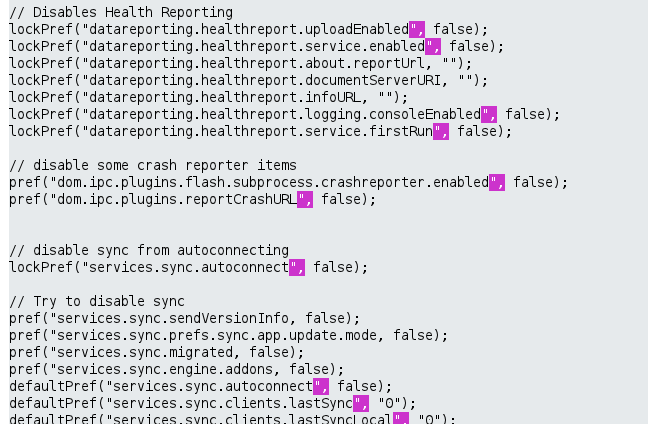
// Disables Health Reporting
lockPref("datareporting.healthreport.uploadEnabled", false);
lockPref("datareporting.healthreport.service.enabled", false);
lockPref("datareporting.healthreport.about.reportUrl, "");
lockPref("datareporting.healthreport.documentServerURI, "");
lockPref("datareporting.healthreport.infoURL, "");
lockPref("datareporting.healthreport.logging.consoleEnabled", false);
lockPref("datareporting.healthreport.service.firstRun", false);

// disable some crash reporter items
pref("dom.ipc.plugins.flash.subprocess.crashreporter.enabled", false);
pref("dom.ipc.plugins.reportCrashURL", false);


// disable sync from autoconnecting
lockPref("services.sync.autoconnect", false);

// Try to disable sync
pref("services.sync.sendVersionInfo, false);
pref("services.sync.prefs.sync.app.update.mode, false);
pref("services.sync.migrated, false);
pref("services.sync.engine.addons, false);
defaultPref("services.sync.autoconnect", false);
defaultPref("services.sync.clients.lastSync", "0");
defaultPref("services.sync.clients.lastSyncLocal", "0");
defaultPref("services.sync.engine.addons", false);
defaultPref("services.sync.engine.apps", false);
defaultPref("services.sync.engine.bookmarks", false);
defaultPref("services.sync.engine.history", false);
defaultPref("services.sync.engine.passwords", false);
defaultPref("services.sync.engine.prefs", false);
defaultPref("services.sync.engine.prefs.modified", false);
defaultPref("services.sync.engine.tabs", false);
defaultPref("services.sync.globalScore", 0);
defaultPref("services.sync.migrated", true);
defaultPref("services.sync.nextSync", 0);
defaultPref("services.sync.tabs.lastSync", "0");
defaultPref("services.sync.tabs.lastSyncLocal", "0");

// disable Sync URLs trying to block it from going out
pref("services.sync.privacyURL", "");
pref("services.sync.serverURL", "");
pref("services.sync.statusURL", "");
pref("services.sync.syncKeyHelpURL", "");
pref("services.sync.termsURL", "");
pref("services.sync.userURL", "");
pref("services.sync.jpake.serverURL", "");
pref("services.sync.addons.trustedSourceHostnames", "");
Ilungisiwe ngu cor-el
appears when I hit post the formating got screwed up. It is formated correctly in my cfg file.
You need to check the mozilla.cfg file and make sure to check that all the pref names have a closing quote as a lot have this quote missing.
Ilungisiwe ngu cor-el