


4 Mail Accounts lost/corrupted in Thunderbird 102 update, Offline folder subscriptions no longer turned on, mail is checked but doesn't appear

After a Thunderbird update to 102, all of my accounts in a particular domain have no email in them. They are listed in "account settings."
All but one account is listed on the left-pane "folders" list. (My LLL account is missing here)
A total of 4 accounts in this domain have no email in them. (AAA, LLL, DDD, NNN)
This happens to be a domain I have through Google, so I checked gmail (a rarity, thanks to Thunderbird) and all of my mail is there.
When I looked at Settings-> the affected accounts -> synchronization and storage, there is a checkbox for "Keep messages in all folders..." and it is checked! I am certain that wasn't previously checked.
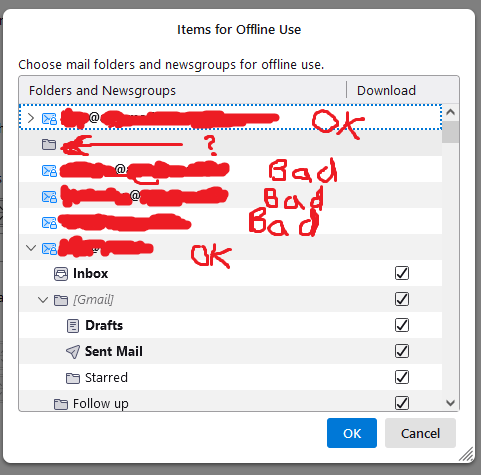
So when I uncheck that box and click advanced (I have been doing this in Thunderbiord for around 15 years), the accounts are missing. There is a gray folder where the account should be.
The ? marks where my LLL account, with >10,000 mails, should be.
Why would this get corrupted? Thunderbird does crash frequently on my PC, but it usually recovers.
I also saw these bad accounts, or at least 2 of them, downloading messages from the server when Thunderbird first ran. But the emails don't show up anywhere.
Also: I have several other email accounts that are acting normally after the Thunderbird update.
Ilungisiwe ngu WallyTesteronie
All Replies (1)
I also saw these bad accounts, or at least 2 of them, downloading messages from the server when Thunderbird first ran. But the emails don't show up anywhere.
Also: I have several other email accounts that are acting normally after the Thunderbird update.
Ilungisiwe ngu WallyTesteronie