


I ask history to be saved for 90 days, but cannot display or search past last month.

Hi. I have asked on the Options to retain browsing history for 90 days. But when I try to look at history, or search hstory, I can only look at Today, This Week, or This Month.
How can I see last month's browsing history?
Thanks!
Tất cả các câu trả lời (2)
I just clicked on More system details... and saw:
browser.history_expire_days 20 browser.history_expire_days.mirror 20
As you can see in the image, I do have this set for 90 (or I don't understand what I am doing).
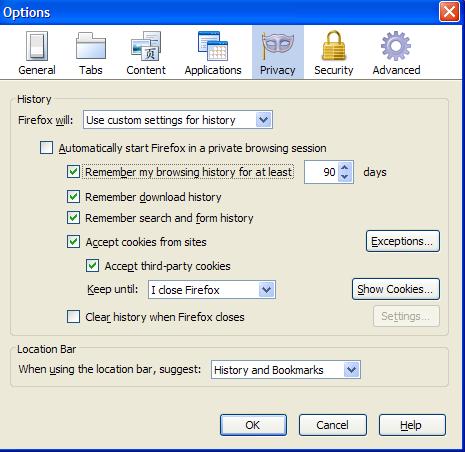
You have set browser.history_expire_days to 20 and that is what matters.
The setting Tools > Options > Privacy > History: "Remember visited pages for at least" refers to the number of days kept in memory (default is 90 days) for quick access.
The pref browser.history_expire_days determines in Firefox 3.6 and earlier what is actually kept.
Firefox 4 will have one generic remember setting (places.history.enabled) and no longer allows to specify a date range.