


Attempting to rebuild Thunderbird with a saved profile

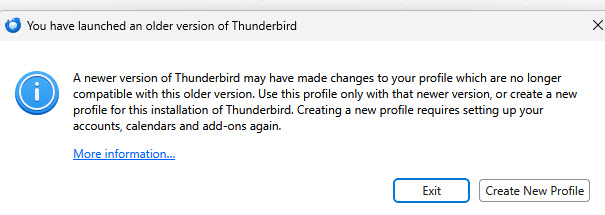
When Thunderbird last updated it trashed my email client. I have been in the process of trying to rebuild it. I am now at the point of having changed the StartWithLastProfile=1 to a 0 so it comes up with a choice of profiles. Unfortunately this is a blind alley. When I tell it to choose the profile with all my emails, etc. I get the attached screen. "More information" does not help. I cant get access to my Thunderbird to confirm my build but based on what I have here I think it is 158ESR. I'm surprised that it thinks this is an older version since this is what Support told me to install in order to get provider for Google calendar add on to work. Someone please help me to get past this point and on to restoring Thunderbird to health. Thank you
Tất cả các câu trả lời (4)
Be sure that Thunderbird is closed, then go to the Profiles folder of Thunderbird as described here the https://support.mozilla.org/en-US/kb/profiles-where-thunderbird-stores-user-data#w_finding-your-profile-without-opening-thunderbird Open the profile folder containing your old date which you would like to use via the Thunderbird profile manager and delete the file "compatibility.ini" Close the profile folder, restart Thunderbird, in the profile manager select the profile you want to open and click "Start Thunderbird"
Được chỉnh sửa bởi Mapenzi vào
Giải pháp được chọn
That did it for bringing back all my emails. We still have one problem. I am on POP. Historically it erased all the emails on my email server when it down loaded them to the Thunderbird client. Now it is leaving them all up on the server. How do I change the settings so it erases/cancels them on the server once they have been downloaded? My server (Fastmail) also keeps a copy of the last two weeks of emails even though they seem to be erased but you have to specially go get those backup copies.
I take it back. I just did not wait long enough. It is now behaving properly. Thank you ever so much for all your help. Question: The next time Thunderbird tells me that an update is available, what should I do? Once burned, twice shy.
Mike Ruby said
Question: The next time Thunderbird tells me that an update is available, what should I do?
Before you update always make a backup copy of your profile folder(s). Or even better copy the entire folder Thunderbird from ...\AppData\Roaming\Thunderbird\ which contains your profile folders and the profiles.ini file