


All received emails are going to spam folder

Starting today (September 3), ALL of my received emails are being put into the Spam folder instead of the Inbox.
FYI, I have been running Thunderbird (TB) for years and have not recently set up any new filters.
I'm currently running Thunderbird 64-bit version 155.0 under Windows 11 Home version 25H2. I am also running Bitdefender Total Security, but I have turned off its Antispam function, both under my usual Standard User account and the Admin account.
I have tried:
1. Going into TB Settings|Privacy & Security|Spam and clicking on "Reset Training Data." 2. After closing TB, I deleted the training.dat file in my TB profile folder and restarted TB. 3. Right-clicked on my Inbox and Spam folders and clicked on "Repair Folder." 4. Exited TB, copied my profile folder to an external HD, uninstalled TB and reinstalled TB after downloading from the official download site. 5. Rebooted my PC.
None of these approaches has worked to solve my problem.
Thanks for any help you can give.
Giải pháp được chọn
I found the solution!
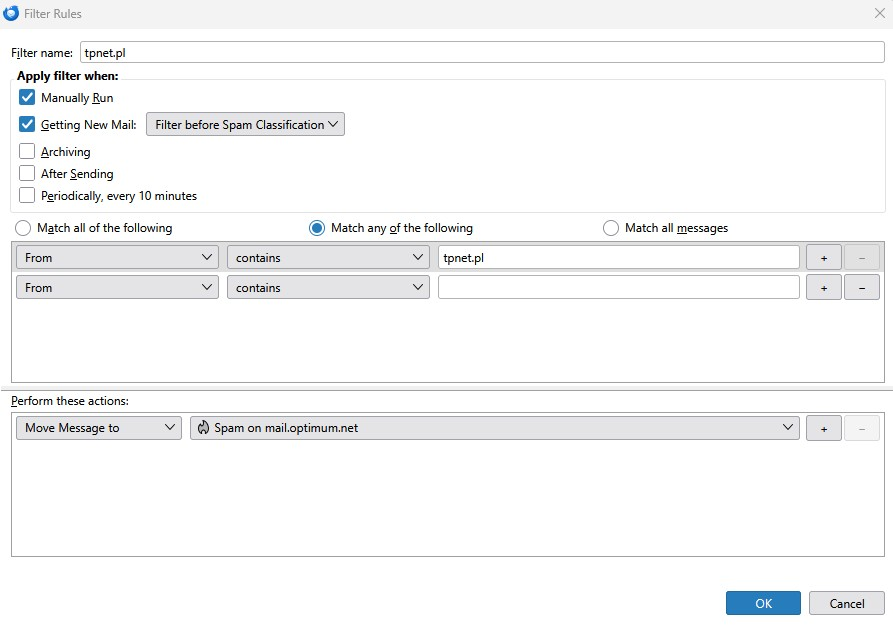
It was due to a filter rule that had an additional matching rule underneath the main one. (And no, I have no idea how it got there—I don't remember doing anything with my filter rule list in ages). This additional matching rule (as you can see from the picture) had a blank filter condition where an email address or domain name would normally be entered, which meant that ANY email coming from ANYONE would be sent to my Spam folder.
Deleting that additional matching rule fixed the problem.
When I reviewed my filter rules, the list displayed did not show the additional matching rule for this entry. I have 80 filter rules and this particular rule was number 78 on the list. I started my quest by disabling all of the rules and then sending myself an email from my secondary email address. That email went to my Inbox. OK, so now I knew it was a filter problem—but which one? I then re-enabled the first 20 filter rules and sent a second TEST email. That one also went to my Inbox. I kept doing that until the TEST message went to my Spam folder instead of my Inbox. I then re-enabled that batch of rules one by one until I had narrowed it down to the one I wound up editing.
Tất cả các câu trả lời (5)
The very first thing to try always is to turn off bit defenders anti-spam tools
Not the 1 - 5 you have listed. They come after you eliminate the obvious culprit which is always the antivirus these days. If Thunderbird did have such an issue this forum would be full of folk complaining, but like all update times there are a few that have paid for antivirus products that only sort of work in a single version of Thunderbird.
Thanks for your reply, Matt.
Please see my third paragraph. Turning off the Bitdefender (BD) antispam was the first thing I tried, although I did not specifically state that—my bad. The annoying thing about the BD antispam is that it turns itself back on after a while, which is why I made sure to log into each user account to make sure it was off under each of them. This behavior, apparently, is a years-old problem.
Looking through my Macrium Reflect backups, I see that the latest version of TB (155.0) was installed on Sept. 3 at 15:46 (3:46 PM) through TB's auto update, which seems to coincide with the start of my issue. Unfortunately, I had moved the initial messages from Spam to the Inbox so I cannot now see when the problem exactly started; I should have left those messages in Spam.
I should mention that, out of a total of about 100 emails that were received and then went into my Spam folder, only 5 were "handled" by BD Antispam. It must have turned itself back on at that point. So it seems to me that the problem is likely related to the TB update to version 155.0, especially since almost all of the diverted emails were placed into Spam by TB, not BD.
I had also checked all my TB message filters for any weirdness, like having a filter where it would send any messages with a blank subject line to Spam; I saw nothing like that.
Anyway, the problem continues to this day.
Giải pháp được chọn
I found the solution!
It was due to a filter rule that had an additional matching rule underneath the main one. (And no, I have no idea how it got there—I don't remember doing anything with my filter rule list in ages). This additional matching rule (as you can see from the picture) had a blank filter condition where an email address or domain name would normally be entered, which meant that ANY email coming from ANYONE would be sent to my Spam folder.
Deleting that additional matching rule fixed the problem.
When I reviewed my filter rules, the list displayed did not show the additional matching rule for this entry. I have 80 filter rules and this particular rule was number 78 on the list. I started my quest by disabling all of the rules and then sending myself an email from my secondary email address. That email went to my Inbox. OK, so now I knew it was a filter problem—but which one? I then re-enabled the first 20 filter rules and sent a second TEST email. That one also went to my Inbox. I kept doing that until the TEST message went to my Spam folder instead of my Inbox. I then re-enabled that batch of rules one by one until I had narrowed it down to the one I wound up editing.
Please download and install https://ftp.mozilla.org/pub/thunderbird/candidates/155.0.1-candidates/build1/win64/en-US/Thunderbird%20Setup%20155.0.1.exe if you are running 155.0 on Windows - it has a fix which has been tested. We would value your immediate feedback that it resolves your problem without introducing new problems.
Wayne Mery, please see my post from Sept. 4, which is right above your post. I found out what the problem was four days ago and fixed it. I marked it as the Chosen Solution.