


Reply-To filter doesn't work

I am using thunderbird client on arch linux. I am trying to filter by adding "Reply-To" as a filter. If i look into the source of the email i am trying to filter (i get like 100s of spam messages and only the Reply To seems to be from the same domain in the end) the Reply-To appears in there.
Any idea how to fix that? The other rules work fine, this one only seems to not work
Tất cả các câu trả lời (4)

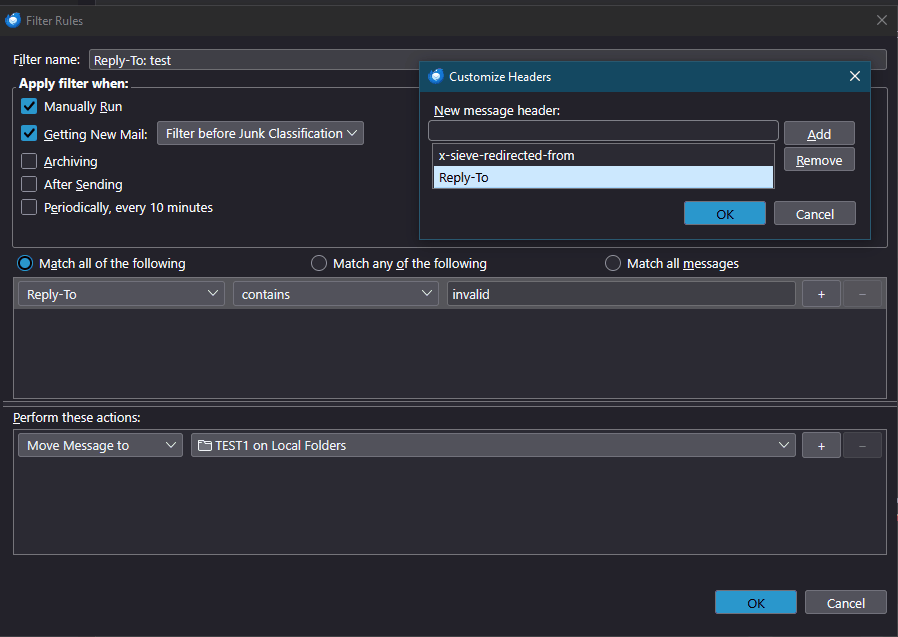
"Reply-To" isn't one of the standard header lines that's available to be filtered on. But you can add it. In the Filter Rules dialog box, under the "match..." choices, scroll down to the bottom of the drop-down list and choose "Customize..." There you can add "Reply-To" (no colon), which can then be used as a criterion.
It works - I just tried it.
Được chỉnh sửa bởi Lin vào
Lin said
"Reply-To" isn't one of the standard header lines that's available to be filtered on. But you can add it. In the Filter Rules dialog box, under the "match..." choices, scroll down to the bottom of the drop-down list and choose "Customize..." There you can add "Reply-To" (no colon), which can then be used as a criterion. It works - I just tried it.
Maybe its an issue with the client at linux? At some point i installed the quickFilters Addon that does exactly the same, made a new filter and somehow it worked. Came back the next day and these filters didnt have the "Reply-To" anymore but said something like "Undefined" (or something similar), i changed it again to "Reply-To" and didn't work again. Added/Removed the filters again but no luck.
Telis Pap said
Lin said
"Reply-To" isn't one of the standard header lines that's available to be filtered on. But you can add it. In the Filter Rules dialog box, under the "match..." choices, scroll down to the bottom of the drop-down list and choose "Customize..." There you can add "Reply-To" (no colon), which can then be used as a criterion. It works - I just tried it.Maybe its an issue with the client at linux? At some point i installed the quickFilters Addon that does exactly the same, made a new filter and somehow it worked. Came back the next day and these filters didnt have the "Reply-To" anymore but said something like "Undefined" (or something similar), i changed it again to "Reply-To" and didn't work again. Added/Removed the filters again but no luck.
I'm finding that filtering on "Reply-To" is not working for me today on either Windows or Linux. That is, it DOES work when I manually apply the filter to the Inbox folder, but it does NOT work when fetching mail. But it did work at one time. I don't know what's going on, but I will investigate further.
Lin said
Telis Pap said
Lin said
"Reply-To" isn't one of the standard header lines that's available to be filtered on. But you can add it. In the Filter Rules dialog box, under the "match..." choices, scroll down to the bottom of the drop-down list and choose "Customize..." There you can add "Reply-To" (no colon), which can then be used as a criterion. It works - I just tried it.Maybe its an issue with the client at linux? At some point i installed the quickFilters Addon that does exactly the same, made a new filter and somehow it worked. Came back the next day and these filters didnt have the "Reply-To" anymore but said something like "Undefined" (or something similar), i changed it again to "Reply-To" and didn't work again. Added/Removed the filters again but no luck.
I'm finding that filtering on "Reply-To" is not working for me today on either Windows or Linux. That is, it DOES work when I manually apply the filter to the Inbox folder, but it does NOT work when fetching mail. But it did work at one time. I don't know what's going on, but I will investigate further.
For me manually applying also doesn't work. I dont know how i managed to do it once, i tried to replicate the steps i did but no luck