


The address marked as “Default” is not displayed first.

Maybe I have not found where to set it, otherwise it is a .change request.
When creating a new message and entering a name in the “To” field, all email addresses for the recipient are displayed for selection. - Order as in the address book - The one marked as “Default” is neither the first nor identifiable as such. The order in the address book cannot be changed either. Thank you --- [German] Als Standard markierte Adresse wird nicht als Erstes angezeigt. Neue Nachricht, Eingabe des Namens in „An“, es alle Email Adressen für den Empfänger zur Auswahl angezeigt. - Reihenfolge wie im Adressbuch - die mit Standard gekennzeichnet ist weder die Erste noch als solche identifizierbar. Reihenfolge im Adressbuch auch nicht veränderbar. Vielen Dank
Giải pháp được chọn
This is interesting, as I had never investigated this. When entering email address on the TO line, Thunderbird does a simple search, character by characters as the letters are entered. For example, had you entered 'office' the default would have been listed first. The only place to my knowledge where the default setting is effective is if you set the addressbook to list on left side of compose screen ( done by pressing F9). Then, if you use the addressbook list and click an entry, the default appears on the TO line. Since the search for the TO line is character by character, identifying by default is not possible. My suggestion is to use the F9 list when wanting to send by default, and use the addressbook, locating name and then selecting the desired alternate email address.
Tất cả các câu trả lời (5)
I cannot find a setting for default in the addressbook. Can you do a screenshot of it? Thank you
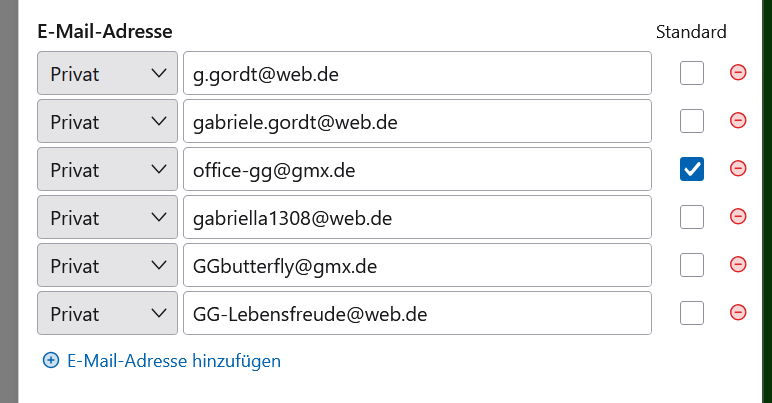
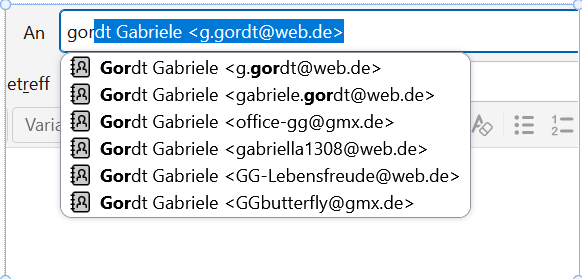
I translated it just to English and do not know how it is named there. First picture: Adressenbuch for a person named Gord. Standard (maybe default in English) is marked. Second when want to write an email and entered "gor" in the To field. All addresses are shown, the default is not identificable at all. The first address in the list is taken (its blue). How to know which is the correct (the default) address without opening and checking Adressenbuch before writing an Email. It would help, if it is shown in first line and taken as default. Thank you.
Giải pháp được chọn
This is interesting, as I had never investigated this. When entering email address on the TO line, Thunderbird does a simple search, character by characters as the letters are entered. For example, had you entered 'office' the default would have been listed first. The only place to my knowledge where the default setting is effective is if you set the addressbook to list on left side of compose screen ( done by pressing F9). Then, if you use the addressbook list and click an entry, the default appears on the TO line. Since the search for the TO line is character by character, identifying by default is not possible. My suggestion is to use the F9 list when wanting to send by default, and use the addressbook, locating name and then selecting the desired alternate email address.
Thank you. it solved my problem.
You are welcome. I was glad to assist.