


Windows 10 reached EOS (end of support) on October 14, 2025. If you are on Windows 10, see this article.

Tìm kiếm hỗ trợ

Tránh các lừa đảo về hỗ trợ. Chúng tôi sẽ không bao giờ yêu cầu bạn gọi hoặc nhắn tin đến số điện thoại hoặc chia sẻ thông tin cá nhân. Vui lòng báo cáo hoạt động đáng ngờ bằng cách sử dụng tùy chọn "Báo cáo lạm dụng".

Tìm hiểu thêm
Mở

InsertSignature button moved from formatting toolbar to top toolbar after Thunderbird 153.0.1 ESR update

maipenrai23

Hello,

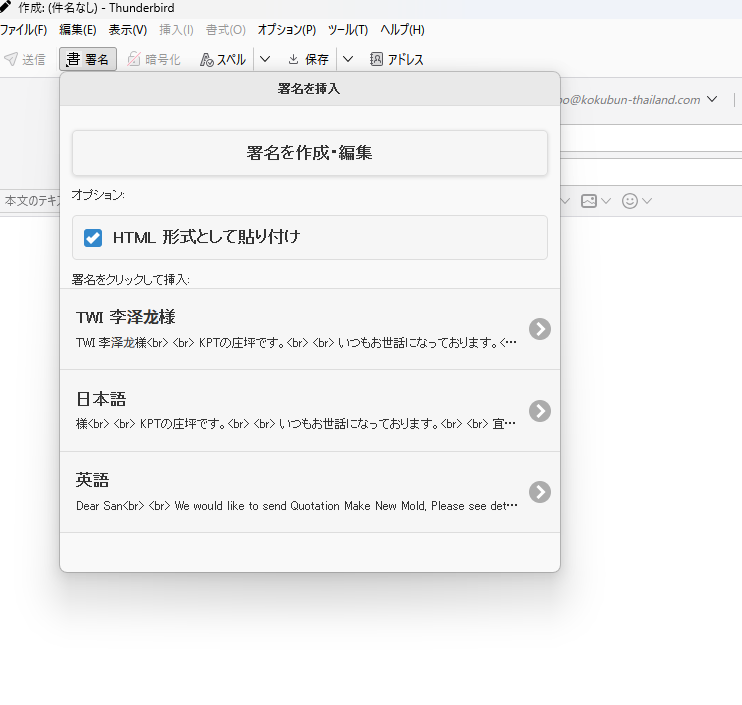
After updating Thunderbird to version 153.0.1 ESR (64-bit), the InsertSignature button changed its position.

Before the update, the "Insert Signature" button was displayed near the message formatting toolbar, next to the "Body Text" selector.

After the update, the button moved to the top compose toolbar next to the Send button.

My environment:

- Thunderbird 153.0.1 ESR (64-bit) - Windows 11 - InsertSignature 0.4.5 - Quicktext 6.9.1

InsertSignature has not been updated recently (version 0.4.5), and this change appeared only after Thunderbird was updated.

The button used to be located immediately next to the "Body Text" selector in the formatting toolbar. Last Friday everything worked normally. Today (Monday) the button position changed.

Is this an intended UI change in Thunderbird 153, or is it a compatibility issue or bug?

If possible, is there any way to restore the button to its previous location near the formatting toolbar?

Thank you very much.
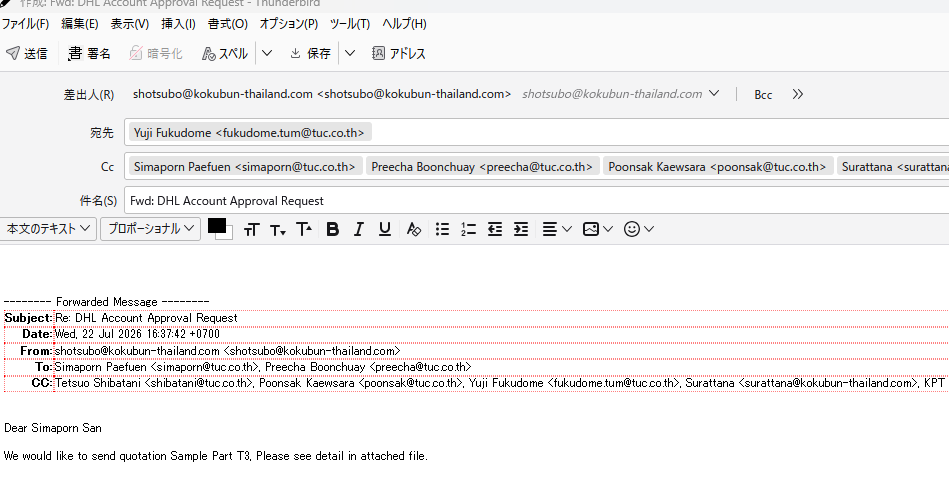
Hello, After updating Thunderbird to version 153.0.1 ESR (64-bit), the InsertSignature button changed its position. Before the update, the "Insert Signature" button was displayed near the message formatting toolbar, next to the "Body Text" selector. After the update, the button moved to the top compose toolbar next to the Send button. My environment: - Thunderbird 153.0.1 ESR (64-bit) - Windows 11 - InsertSignature 0.4.5 - Quicktext 6.9.1 InsertSignature has not been updated recently (version 0.4.5), and this change appeared only after Thunderbird was updated. The button used to be located immediately next to the "Body Text" selector in the formatting toolbar. Last Friday everything worked normally. Today (Monday) the button position changed. Is this an intended UI change in Thunderbird 153, or is it a compatibility issue or bug? If possible, is there any way to restore the button to its previous location near the formatting toolbar? Thank you very much.
Đính kèm ảnh chụp màn hình

Tất cả các câu trả lời (1)

Since this is a feature of the InsertSignature add-on and not of Thunderbird itself, you'll be better off asking the add-on's developer. The add-on page has links to his email and project site.

https://addons.thunderbird.net/en-US/thunderbird/addon/insertsignature/

Đặt một câu hỏi

Bạn phải đăng nhập vào tài khoản của bạn để trả lời bài viết. Vui lòng bắt đầu một câu hỏi mới, nếu bạn chưa có tài khoản.