After installing Thunderbird for android it only show the outbox for all my accounts. How can I see the inbox ??Thank you. Axel
After installing Thunderbird for android it only shows the outbox for all my accounts. How can I see what's in the inbox ?? Thank you. Axel
Tất cả các câu trả lời (1)

Giải pháp được chọn
Seeing only outbox occurs when the app has never signed into to your accounts. The imap folder list is only downloaded after connecting to your mail provider.
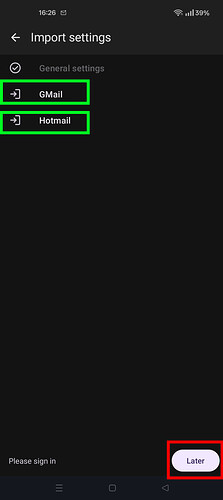
You likely tapped sign-in "later" during QR code or file import, instead of tapping each acount name in turn and completing the oAuth sign-in process for each. See screen shot.
You can resolve two ways.
A)
Repeat for each account. 1. Navigate to settings > account name > fetching mail > incoming server 2. Tap next 3. Tap the Sign-in button 4. Login to your provider and grant the app permissions. 5. Navigate to settings > account name > sending mail > outgoing server 6. Tap next. Your settings will be checked.
B)
1. Reinstall the app 2. Import accounts (via QR code or file) 3. Tap each account name and complete it's sign-in flow,