


Quitting before start complete kills tabs. (bug1904211)

If Thunderbird startup is stopped before tabs are loaded, they are lost. The tab fields at the top of the screen remain but they are empty. Evidently, tabs are stored only in a temporary location. This is a very annoying bug. Is there a way to recover them?
Được chỉnh sửa bởi Wayne Mery vào
Tất cả các câu trả lời (4)
On quitting Thunderbird open tabs are stored in the session.json file in the Thunderbird profile. On next start Thunderbird automatically restores the previous session. But why should Thunderbird quit on startup? If this happens I would rather call this a crash. And if there is a crash you won't see neither the Thunderbird window nor the tab bar. Can you be more precise?
This is not a crash. This is when I click to open Thunderbird, it is in the process of loading, it has appeared on the screen, the list of mailboxes shows, but the tabs have not yet filled with their content. It can take ten seconds or more for them to load, though I have a very fast computer (AMD 3900X, 32 GB RAM) and both the program and the data are stored on a solid-state drive. I do have a lot of mailboxes, if that makes any difference. I change my mind and decide that I don't want to run Thunderbird now, or I want to close apps before shutting down the computer. I click on the X in the upper right corner to close Thunderbird. When I reopen it later, the tab fields are present but they are empty, and the main part of the screen (currently open tab) also is empty. The problem is clearly that the tab content is not being stored anywhere for retrieval before the json file is updated.
This is similar to the problem in Firefox with losing tabs in a main window when closing it in a secondary window, only in Firefox there is the option to open all windows that were previously open.
Được chỉnh sửa bởi jsallen vào
Bug 1904211 - Exiting Thunderbird during startup causes any message tab that didn't load to be blank in future sessions is currently being investigated.
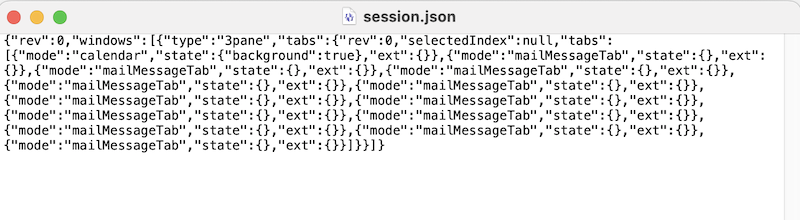
Thanks for the hint, Wayne. I just reproduced the issue and can confirm the outcome. See my session.json file after interrupting Thunderbird startup
Được chỉnh sửa bởi Mapenzi vào