


Icloud calendar does not sync with Thunderbird calendar

I successfully linked / synced the thunderbird calendar with the iCloud calendar. Calendar entries manually entered in iCloud or iPhone calendar are successfully synced and are visible in the thunderbird mail. The other way round, syncing the existing entries in the Thunderbird calendar does not work. They do not appear in the iCloud or iPhone calendar. Searching the internet, the specific Thunderbird or Apple help-sites did not provide an obvious solution for this problem. I went through all (or nearly all) recommendations given by Apple, no success to sync from Thunderbird to iCloud.
Any suggestion what to modify or adjust
jm
Tất cả các câu trả lời (6)
The default calendar in Thunderbird is named "Home". It seems to me that before creating a CalDav calendar in Thunderbird (TB) with your iCloud "Home" calendar you had already used the Thunderbird "Home" calendar to create events. I have no solution how to sync the TB "Home" calendar with your macOS calendar.
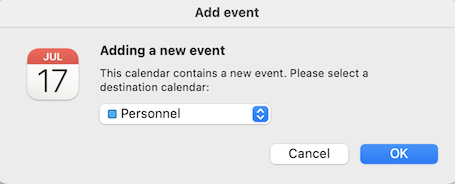
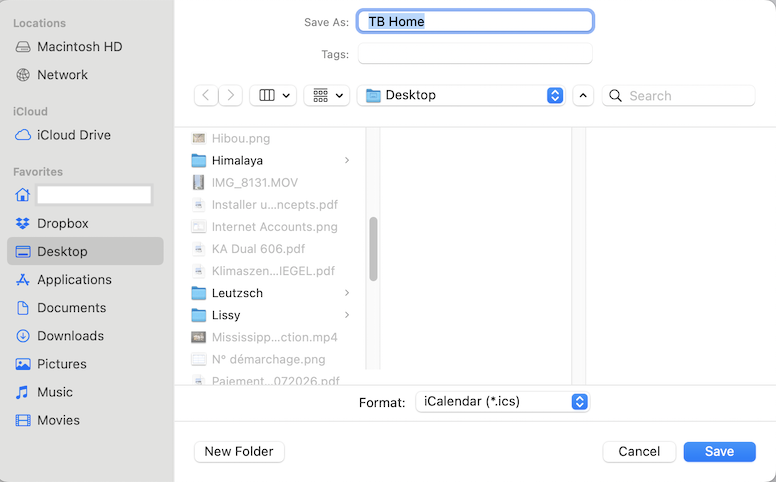
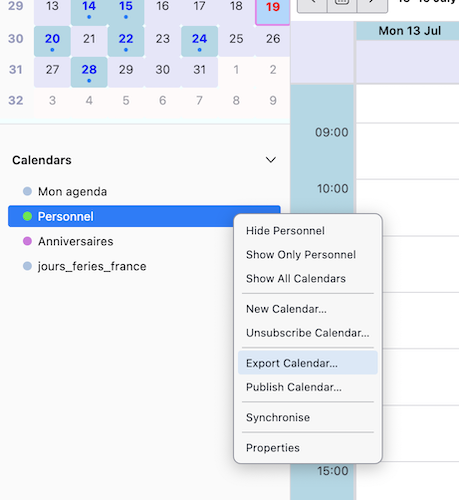
A workaround might be to merge the events of the TB Home calendar with your iCloud calendar: in TB R-click on Home calendar and choose "Export Calendar..." A Finder window will open (image): select *.ics format, choose a file name and the destination location. On your Mac open "Calendar" > File > Import > navigate and select the exported *.ics file and click "Import". A dialogue box will open and prompt you to choose a destination calendar > choose your iCloud calendar (in my image the Mac iCloud calendar is named "Personnel"). This way the events of your TB Home calendar will be merged with the events of your iCloud calendar which is already synced with Thunderbird as a CalDav calendar. If this operation is successful I advise to hide the Home calendar in TB, otherwise some events would be doubled.
Được chỉnh sửa bởi Mapenzi vào
I read your work.around suggestion. I am unable to find the "export calender" function on my Windows 11 / TB 140.12.1esr (64-bit) installation. I think the proposed work-around is not useful since new entries in TB calender will then not synchronise with iCloud calendar, Thanks anyway for your suggestion
I had proposed to export your Thunderbird calender, not your Windows calendar if there is any. BTW I erroneously assumed that you were running macOS but now you tell me that it's Windows.

jm, if I understand correctly, you say that you have connected a non-iCloud calendar in Thunderbird, e.g., Thunderbird's "Home" calendar unless you changed the name, to an iCloud calendar, but the synch between the two goes only from iCloud to Thunderbird, not from Thunderbird to iCloud. And you want it to go both ways.
Is my understanding correct?
How did you connect a non-iCloud calendar in Thunderbird to an iCloud calendar? I would not have thought that possible.
Or are you saying that you have set up your iCloud calendar in Thunderbird but synching is going only one way? I tested my iCloud calendars in Thunderbird today to help with this matter. Synching went both ways. Did you set synchronization frequency and/or give the "Synchronize" command before concluding that bi-directional synch was not working?
If you want your calendars to synch both ways, I would think that you would want to use iCloud calendars exclusively. The best idea that I can come up with is the one that Mapenzi has offered: consolidate your calendars on a service (iCloud) that is designed for synching.
Please tell me if I'm not understanding something.
Sorry for the delay in response, I had many activities during the last day. My basic wish: Read the TB calendar on my iPhone. This obviously goes via the iCloud calendar.
I think you understand correctly. I synced my TB calendar with the iCloud calendar using: Creating the app-specific password in the apple account. Selecting the "Create New Calendar on Network" option in TB.
There I selected the proposed calendar. It syncs from iCloud to TB but not vice-versa
I do not know which TB calendar was selected since I do not see any name and do not know how many I have
I do not like the iCloud calendar as the primary source.
So I am not any further
If you have any additional ideas, let me know
jm
I believe that you subscribed to an iCloud calendar. Subscriptions go only one way. They do not synch in two directions. See here:
https://support.mozilla.org/en-US/kb/creating-new-calendars
I doubt that what you want to do is possible.