


Tránh các lừa đảo về hỗ trợ. Chúng tôi sẽ không bao giờ yêu cầu bạn gọi hoặc nhắn tin đến số điện thoại hoặc chia sẻ thông tin cá nhân. Vui lòng báo cáo hoạt động đáng ngờ bằng cách sử dụng tùy chọn "Báo cáo lạm dụng".

Tìm hiểu thêm
Mở

Trapped in Cupertino: Firefox permanently locks macOS virtual background (Apple Park Rainbow)

mister_zed

Hello Mozilla Team,

I am facing a glitch that is as hilarious as it is frustrating. Firefox has decided that my professional life must permanently take place under a massive, virtual Apple Park Rainbow. And I cannot turn it off.

The Tragic Backstory: This is the system-level macOS camera background. Usually, you disable it via the green camera icon ("pill") in the macOS menu bar. However, the moment Firefox accesses my FaceTime HD camera, the macOS camera menu completely freezes. It becomes unclickable.

What I’ve tried so far (and failed):

   Google Meet says "No effects applied". It has no idea the rainbow is even there.
   I used "Refresh Firefox" to completely wipe my profile. The rainbow survived.
   I forcefully revoked camera permissions via Terminal (tccutil reset Camera org.mozilla.firefox). Upon granting permission again, the rainbow immediately returned from the dead.
   Restarted the Mac multiple times. No change.
   Even opening the native FaceTime app to override the toggle failed, because Firefox seems to have locked the video pipeline down.

It seems Firefox is caching or hard-locking the macOS video effect stream and won't release it, while simultaneously breaking the OS-level menu bar toggle.

I love rainbows, but my clients during business calls are starting to wonder about my sanity. How do I force Firefox to drop this video stream and let me return to reality?
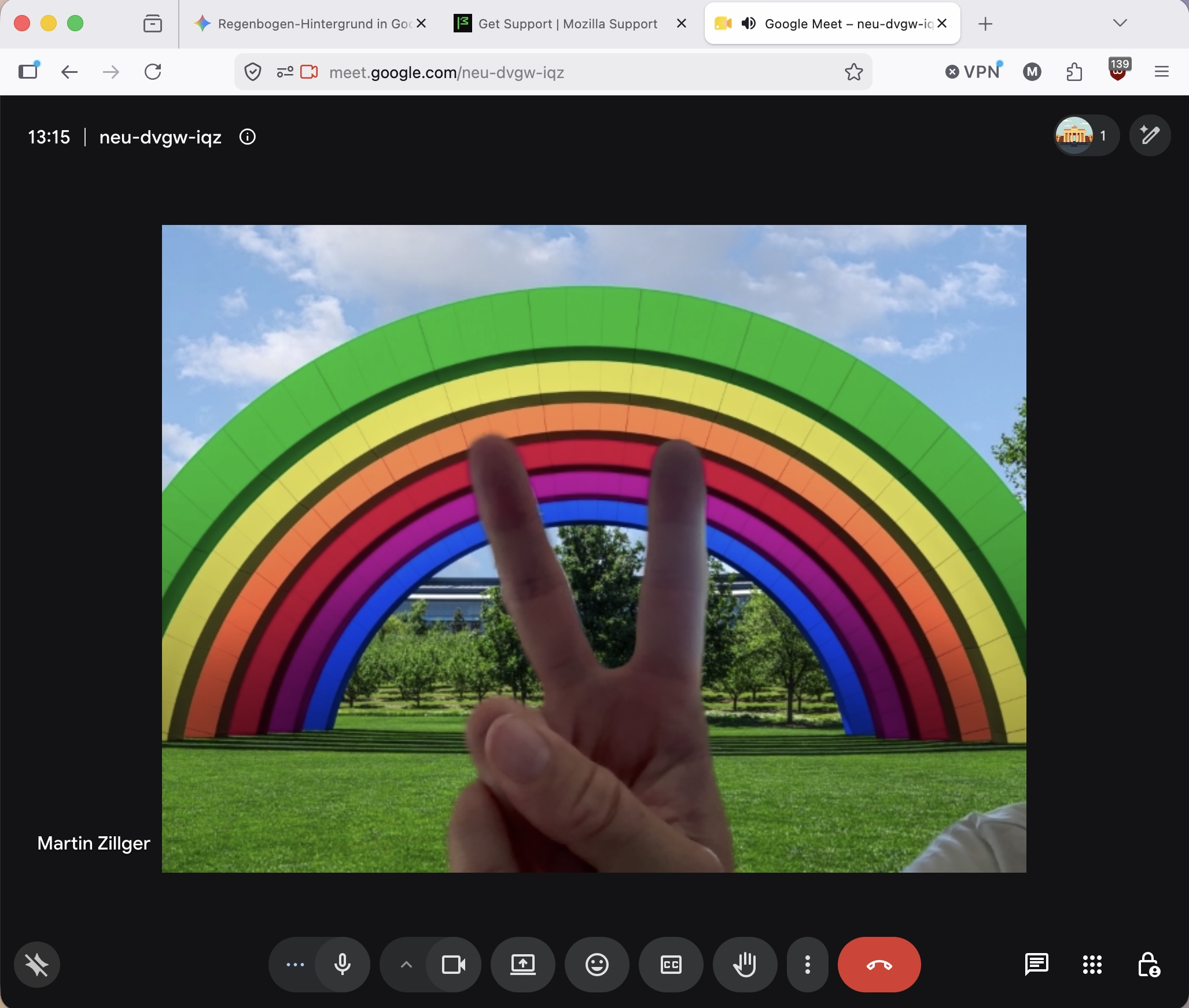
Hello Mozilla Team, I am facing a glitch that is as hilarious as it is frustrating. Firefox has decided that my professional life must permanently take place under a massive, virtual Apple Park Rainbow. And I cannot turn it off. The Tragic Backstory: This is the system-level macOS camera background. Usually, you disable it via the green camera icon ("pill") in the macOS menu bar. However, the moment Firefox accesses my FaceTime HD camera, the macOS camera menu completely freezes. It becomes unclickable. What I’ve tried so far (and failed): Google Meet says "No effects applied". It has no idea the rainbow is even there. I used "Refresh Firefox" to completely wipe my profile. The rainbow survived. I forcefully revoked camera permissions via Terminal (tccutil reset Camera org.mozilla.firefox). Upon granting permission again, the rainbow immediately returned from the dead. Restarted the Mac multiple times. No change. Even opening the native FaceTime app to override the toggle failed, because Firefox seems to have locked the video pipeline down. It seems Firefox is caching or hard-locking the macOS video effect stream and won't release it, while simultaneously breaking the OS-level menu bar toggle. I love rainbows, but my clients during business calls are starting to wonder about my sanity. How do I force Firefox to drop this video stream and let me return to reality?
Đính kèm ảnh chụp màn hình

Bạn phải đăng nhập vào tài khoản của bạn để trả lời bài viết. Vui lòng bắt đầu một câu hỏi mới, nếu bạn chưa có tài khoản.