


Windows 10 reached EOS (end of support) on October 14, 2025. If you are on Windows 10, see this article.

Tìm kiếm hỗ trợ

Tránh các lừa đảo về hỗ trợ. Chúng tôi sẽ không bao giờ yêu cầu bạn gọi hoặc nhắn tin đến số điện thoại hoặc chia sẻ thông tin cá nhân. Vui lòng báo cáo hoạt động đáng ngờ bằng cách sử dụng tùy chọn "Báo cáo lạm dụng".

Tìm hiểu thêm
Solved

I never requested your vpn but apparently it's on my computer anyway. I already have a vpn that I use.

James đã trả lời
Shawn Fagalde

I don't know how or why but apparently Mozilla VPN has been installed on my computer. I don't think I ever requested it as I have Express VPN and I never subscribed to it. I've attached a screenshot and I don't know what else this could mean (note: I am technologically challenged). I didn't have my Express VPN turned on at the time I took this picture.
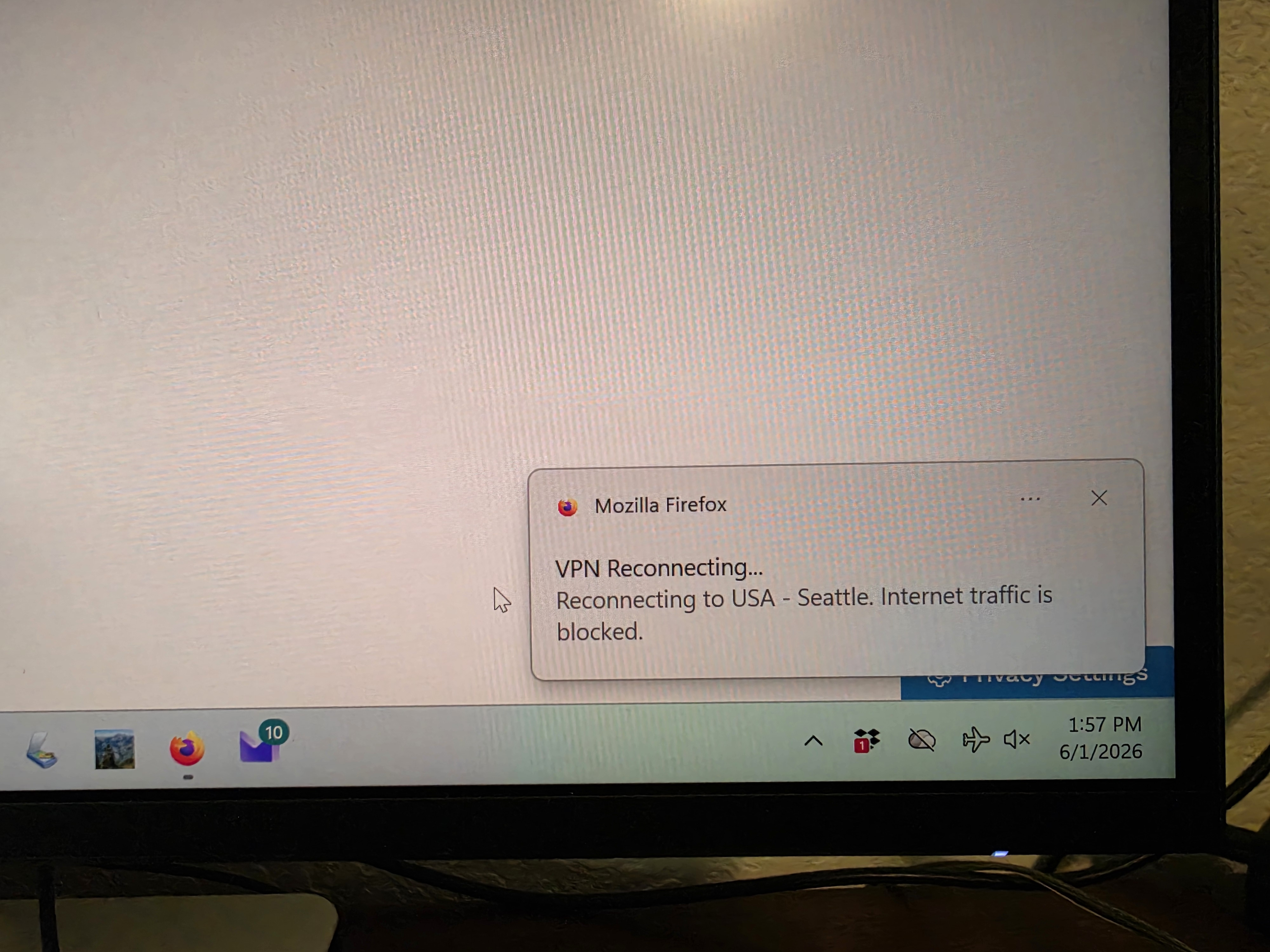
I don't know how or why but apparently Mozilla VPN has been installed on my computer. I don't think I ever requested it as I have Express VPN and I never subscribed to it. I've attached a screenshot and I don't know what else this could mean (note: I am technologically challenged). I didn't have my Express VPN turned on at the time I took this picture.
Đính kèm ảnh chụp màn hình

Tất cả các câu trả lời (2)

Hi,

The Firefox built-in VPN is being introduced gradually. It’s available to some users in the US, UK, Germany, and France (starting with Firefox version 149), and in Canada starting with Firefox version 150.

If you wish, you can post your feedback about the Firefox built-in VPN to the Mozilla Connect thread.

Additionally, your computer is currently using "Flight Mode". This disables your Wifi/Bluetooth connection. You can enable it by clicking on the airplane lane Icon, then clicking on the "Flight Mode" toggle to turn this off.

Được chỉnh sửa bởi winui64 vào

Giải pháp được chọn

said

I don't know how or why but apparently Mozilla VPN has been installed on my computer. I don't think I ever requested it

"Mozilla VPN" refers to the standalone subscription based Mozilla VPN app https://www.mozilla.org/products/vpn/

The VPN in Firefox is built-in desktop Firefox and is turned off by default. You have to do a few steps to even turn it on to start with.

https://support.mozilla.org/en-US/kb/built-in-vpn https://www.firefox.com/en-US/features/browser-with-built-in-vpn-secure-browsing/

Đặt một câu hỏi

Bạn phải đăng nhập vào tài khoản của bạn để trả lời bài viết. Vui lòng bắt đầu một câu hỏi mới, nếu bạn chưa có tài khoản.