


Mail to Gmail Accounts Goes To Spam Folder

My business has two domains. I can send email to a Gmail account holder using the primary domain with no issues. But amy emails from what I call the "secondary" domain below are treated as spam. This occurs with two different email addresses using the secondary domain.
Both domains are hosted with Bluehost. Exhaustive research has revealed the following:
- Settings in Thunderbird are exactly the same, e.g. ports, security, SSL/TLS, etc. for each domain.
- There is no subject line or content that could possibly be regarded as spam.
- MXToolbox indicates that the secondary domain is not on any blacklist.
- Extended support via Bluehost reveals that SPF, DKIM, and DMARC records are all correct.
- Email sent to a Gmail account using the CPanel (Roundcube) is not flagged as spam. Only emails sent via Thunderbird are flagged.
- Emails sent to a Gmail account from the secondary domain using my mobile phone, but still on the same network/IP address, are not flagged as spam.
- If I first send an email to one of the secondary domain emails FROM Gmail, then reply to it, the reply is not flagged as spam.
After many hours of head scratching (and later, head banging), I am pretty much at my wit's end with this problem. I'm an electronic engineer but this one is definitely out of my wheelhouse. Any help would most certainly be appreciated!
Thanks in advance, Don
Tất cả các câu trả lời (19)
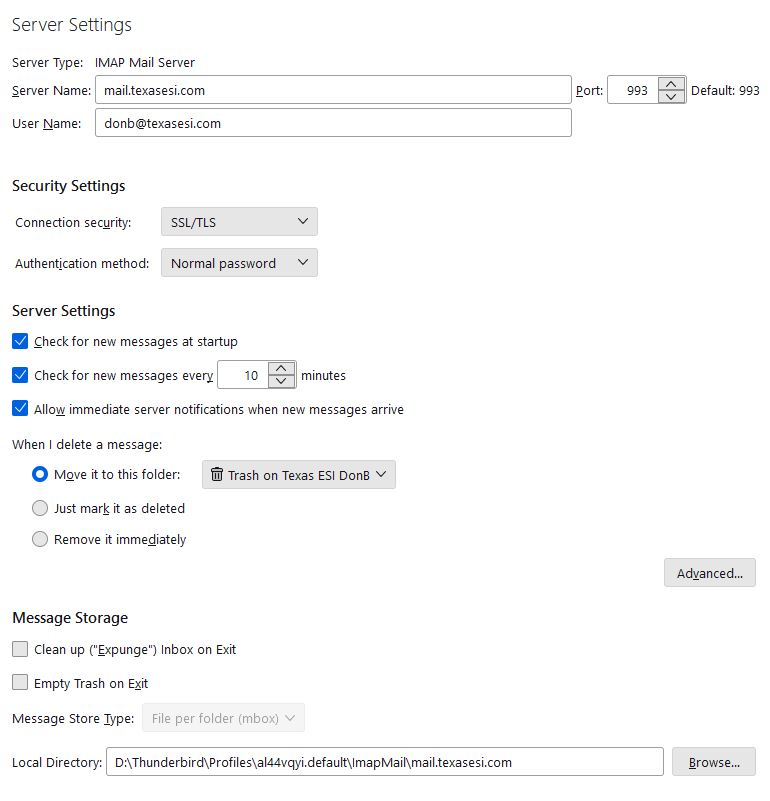
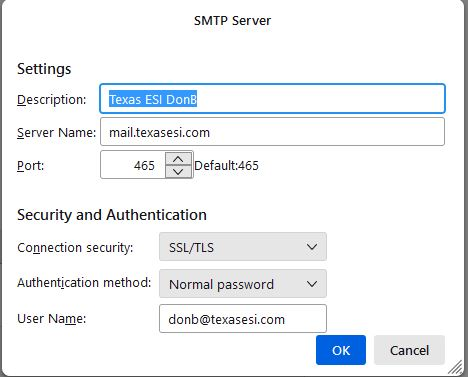
It may help to post screenshot of server settings pane and SMTP server settings pane for that account. That would provide some possible ideas. thank you
My apologies for the long delay, we had a death in the family.
Here are the requested images. Note that all settings except the actual domain name are exactly the same between the "primary" email account (whose mail is not marked as spam by the Gmail servers) and the "secondary" email account below, whose email is treated as spam when received by a Gmail recipient.
Thanks, Don
Are you using a sig on the email? Fancy sigs can trigger being flagged as spam.
Hi David,
No sir, no sig at all.
Thanks again, Don
All I can think of that there is an error somewhere in bluehost's settings. BUT, I will also see if I can get a super guru to look at this. There are a few, if I can free one up.
Thank you very much, David, I appreciate the help. It's certainly a mystery to me.
Don
Look at a sent message also. Sometimes antivirus products insert advertisements in sigs. Just a thought...
No advertising is being inserted. But in tinkering, I've noticed something else very bizarre.
If I send a message from the secondary domain only to a Gmail account, it gets flagged as spam. But for some unknown reason, if I also cc: another non-Gmail account, the message properly gets to the Gmail user's inbox!
I have not 100% verified this behavior, but have observed it on at least three (3) different emails I've sent. Very strange behavior...
I am lost. I do have a fear of web-hosted email. I have used them and performance is never completely reliable. But I am prejudiced. Maybe someone can see through this. My hunch is bluehost, but I have no good reason for that.
I sincerely appreciate your efforts to help, David. This one is definitely beyond me as well - I was floored when a simple cc: to someone else made the email land in the proper location.
Thanks again and take care.
Don
we didn't have this problem with typewriters...
No kidding! I can still hear the bell ring to shove the platen back to the other side...
just an off the wall thing thatI suspect might affect delivery to google. If it does, some feedback would be great.
Use the Config Editor to change the hidden preferences mailnews.headers.sendUserAgent to True and mailnews.headers.useMinimalUserAgent to False and see if it makes any difference. The first should be already true but you never know.
Failing that........
GoogleDon_CC12 said
Note that all settings except the actual domain name are exactly the same between the "primary" email account (whose mail is not marked as spam by the Gmail servers) and the "secondary" email account below, whose email is treated as spam when received by a Gmail recipient.
what are both the domain names? Can you check in ouotgoing server (SMTP) that you have two outgoing servers configured and they use the correct domain name for the email address? Check the identity part of account settings (the first pane above server settings) confirm the correct outgoing server is configured for the identity. Click the manger identities for each account and ensure you only have one, or if more than one each has the correct SMTP server configured.
Thanks very much for your thorough reply, Matt. I'm having quite the start to my week here but will try the things you suggested and get back with the results, hopefully very soon.
Don
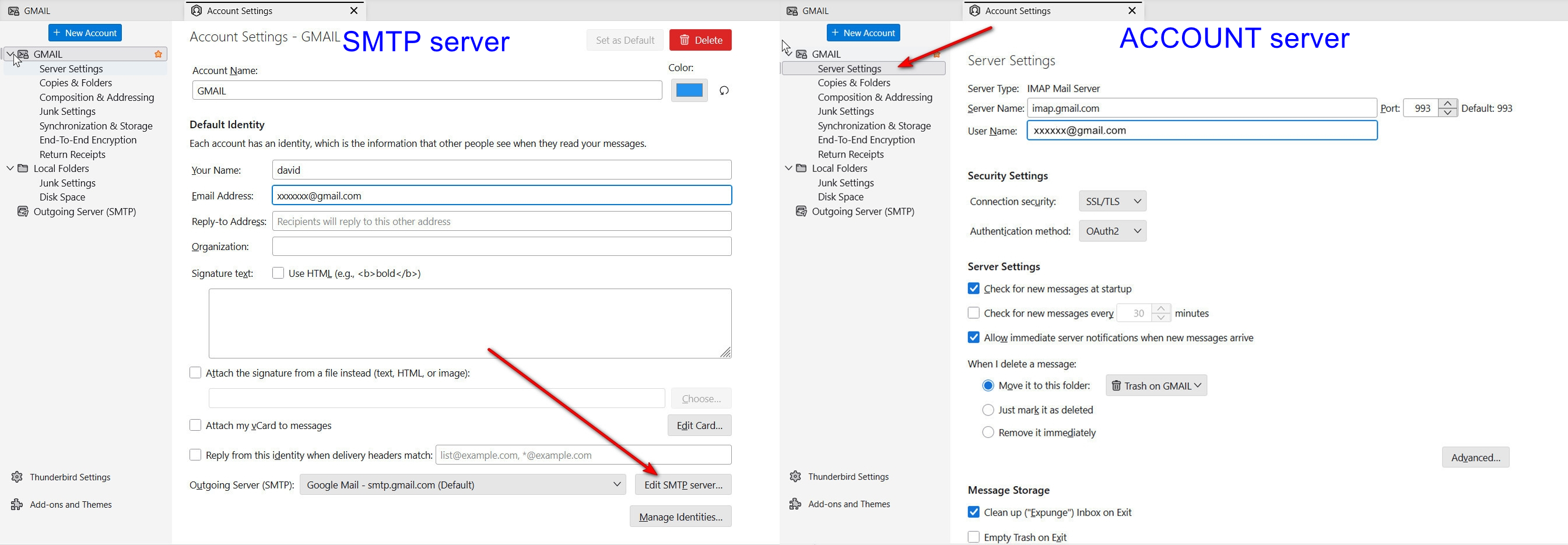
I think Matt may have nailed it. if you are sending from an SMTP server with different email id than the account's email id, that will cause problems. This occurs frequently when a person has two or more accounts with the same email provider. Do check the email address in server settings pane and compare to that in SMTP pane. I attached screenshots on how to locate each.
Guys, not sure how to direct this post specifically to each of you here.
Matt, mailnews.headers.sendUserAgent was already set to true. I did change useMinimalUserAgent to false per your suggestion but no joy.
David, thanks for the screenshots. Domain names are texaselectronicsolutions.com (primary) and texasesi.com (secondary). I verified once again that server and user names are identical between the server settings and the outgoing SMTP settings.
Here's another weird bit. I have two personal Gmail addresses. I send an email from the primary account to one and cc: the second.
These get to Gmail account #1, no problem. But they are consistently flagged as spam by Gmail account #2.
Emails from the secondary account are flagged as spam by both Gmail accounts.
Gentlemen, I really appreciate the help you're providing. If there is anything else you can think of I need to try, just let me know. Thanks again.
david said
This occurs frequently when a person has two or more accounts with the same email provider.
The historical context is that Thunderbird did not add an additional SMTP server if there was one for that domain when an account was added. Therefore older accounts are most frequently affected by changes at the server level with the provider not allowing relay for other accounts as they tighten their phishing and scam rules.
Don_CC12 said
Domain names are texaselectronicsolutions.com (primary) and texasesi.com (secondary). I verified once again that server and user names are identical between the server settings and the outgoing SMTP settings. Here's another weird bit. I have two personal Gmail addresses. I send an email from the primary account to one and cc: the second. These get to Gmail account #1, no problem. But they are consistently flagged as spam by Gmail account #2. Emails from the secondary account are flagged as spam by both Gmail accounts. Gentlemen, I really appreciate the help you're providing. If there is anything else you can think of I need to try, just let me know. Thanks again.
I will post some images of my own as I am not confident the one to one link on Identity is clear.
Thunderbird offers identities with incoming mail accounts and overall they are either ignored or very poorly understood. Mostly ignored as far as I gather.
Thunderbird, like any mail program has a primary function as mail aggregator, it gets all your mail at one location from multiple addresses. Now this aggregation has another side. Historically mail servers could and frequently did merge mail addressed to one address and drop it into another. So mail to abuse@ and admin@ and sales@ might all appear in the mail account for billing@ and the individual that replied to those email really would prefer the reply came from the address the mail was sent to, not the one they regularly use. The idea is it looks more professional and for the one man bands, of which there are plenty, it makes the business appear larger. Enter Identities.
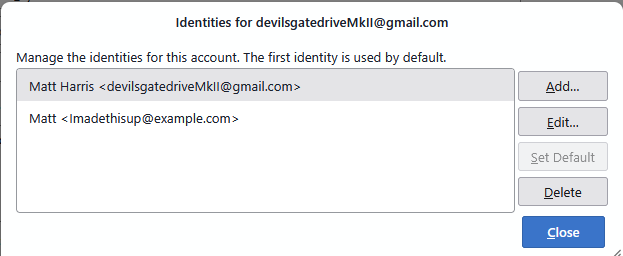
These are a couple of identifies on an account in my Thunderbird daily test environment. Identities per account are technically unlimited, so it is a good idea to check occasionally that you do not have any you are not exactly aware of. My point in including this image is that this is the only place in settings you will find a reference to this identity (imadethisup@example.com) to modify the details of that particular identity.
When a write window is opened, the identity is shown as an option for sending mail "from"
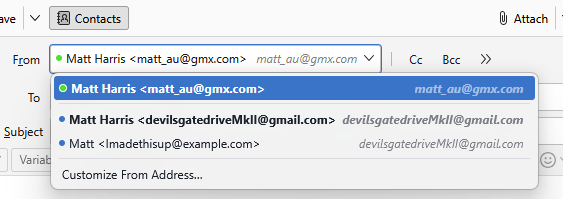
But my observation is very few people look at that entry at all, unless there are sending mail and it is going out from what they perceive to be the wrong address.
Now we have an identity and it needs an outgoing server(SMTP)
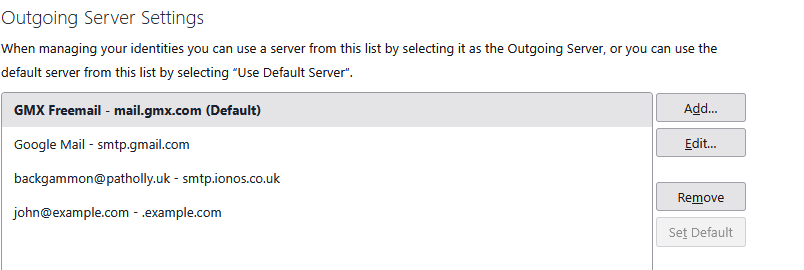
Here you can see I have an additional outgoing server configured for my IMADETHISUP identity. (that appears here as John@example.com)
Now to try and bring this together. David offered this image.
It certainly make clear how to edit the SMTP server for the identify selected, but it has a couple of minor limitations that may be relevant here
IF you share an SMTP server setting between account then clicking the botton drops you into the same outgoing server settings regardless of the identity clicked. This is not a problem, unless you are not aware you need separate outgoing servers per identity, and it is here I think we still have an issue.
You have four accounts. When you go into outgoing servers(SMTP) do you have four outgoing server configured as a minimum?
You will need two for Google, one for each login name and one each for texasesi.com and texaselectronicsolutions.com
You issues with Google detection you gmail as spam sounds like using the wrong outgoing server username for the account. YOu work domain issue sounds like a reverse DNS problem.
So I tried looking up both domains with MX toolbox
texasesi.com returned

and texaselectronicsolutions.com returned

So I checked the SMTP for texasesi.com and found that there is a reverse DNS issue.
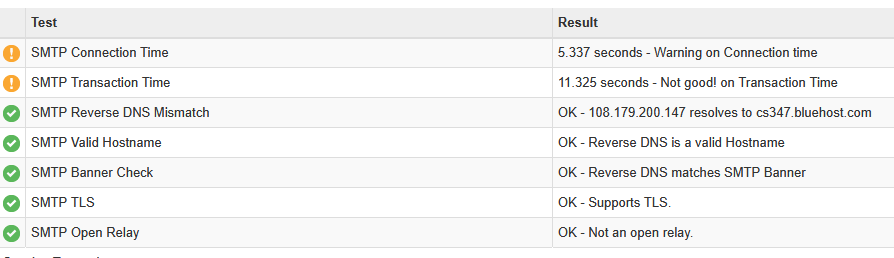
Google and most major mail providers these days use reverse DNS as a spam identification method. I am not surte what you need to address wit6h your domain registrar to fix the reverse DNS issue, but that is at the heart of your delivery issues with that particular domain. I suggest some quality time with a professional domain person instead of a community support forum. Perhaps blue host can give you instructions. I can not.
texaselectronicsolutions.com does not suffer reverse DNS issues as it's registered mailexchanger is the antispamcloud.com domain so reverse DNS matches he MX record. It may be as simple as putting the bluehost domain in your domains MX record, but I really don't know.
Matt, thanks so much for going above and beyond with your troubleshooting help! Just amazing assistance from both you and David as well.
I definitely have outgoing servers configured for both primary and secondary accounts. The secondary account uses mail.texasesi.com as expected and the user name is also donb@texasesi.com. Interestingly, I was told years ago to use Box6137.bluehost.com for the outgoing server on the primary account and have never changed it.
There are also two more listed for each of my Gmail accounts.
It does indeed look like the reverse DNS issue is at the heart of the secondary address problems. Guess it's time to escalate this to a someone who does this stuff for a living. I've reached out to Bluehost on more than one occasion and their only response is that if email from the secondary address to Gmail through the web interface goes through just fine (it does), then the problem must be with Thunderbird.
Sometimes I wish I knew more about this stuff... and sometimes I am very glad that I don't, lol
Many thanks again, Don
Web hosted email is always a crap shoot. I recall when I used it years ago that the web host sometimes changed the servers without notifying me. You might recheck your cpanel to see if the servers are still the same.