


Recently I have been getting unwanted reminders for events on my Google calendar.

I have been using Mozilla Thunderbird for many years on Windows desktop (now Win 11 ver 24H2 for x64 based systems).
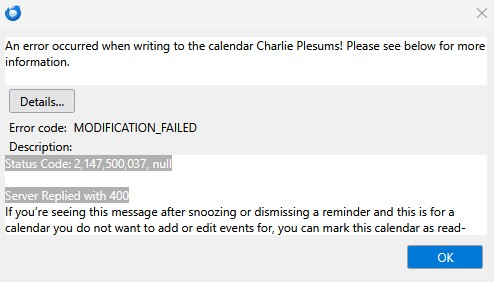
In the last week or two Thunderbird has been giving me unwanted reminders for future events on my Google Calendar. (They are Thunderbird reminders, since they disappear when closing Thunderbird). If I try to dismiss them I get an Error Code: Modification failed. Status Code: 2,147,500,037, null Server Replied with 400
Dr google suggestions to get rid of them only apply to iOS or Android, nothing mentions windows. The problem does not occur on my iPhone.
If I just close the reminder windows they reappear in a few minutes.
I uninstalled and reloaded to be sure I had the latest Thunderbird.
Tất cả các câu trả lời (1)

You're not the only one. This has been an ongoing issue with Thunderbird and Google Calendar for years. Local calendars work fine. Maybe other on-line calendar services. But Google... nope. It seems to be a permissions issue on Google's side that nobody has been able to surmount, as far as I know. There have been a number of suggested fixes and workarounds, none of them I have found to work. The only solution I have found has been to disable notifications for that calendar (uncheck the "Show Reminders" option from that calendar's right-click Properties context menu.)