


Can I use TB to store all old email which I want to delete from server?

Hi all. My mail account reached 50 GB (it's too much) and this is what I plan to do:
1) Download all emails to TB 2) Remove emails older then 1 year from server (for now I don't know how to do that) 3) Keep all emails in TB and use it as my local database - if I'm looking for some old mails then I will go to TB
Important information - daily I don't use TB. I log to my mail via web gui.
The question is - what TB will do when it connects to server and notices that older emails are deleted. Will TB also delete them locally? It's not what I want - my goal is to keep old emails locally. Should I disconnect TB from server after downloading all email by changing credentials?
Please tell me what you think about that plan. Do you see better way to store old emails and keep mailbox slim on the server? I want to fit in 2-5 GB.
By the way do you have idea how to delete mails older then 1 year from server? I have shell access.
Tất cả các câu trả lời (3)
I presume the account is IMAP. Yes, if you delete locally, the messages are deleted from server. The solution is to copy old messages to Local Folders and then to delete from server. I just responded yesterday to a user with the same problem, but differently worded. I think if you read that thread you will see exactly what to do. https://support.mozilla.org/en-US/questions/1564841 Any questions, just reply back to this thread. Basically, the steps are - use a filter to identify the old messages and copy them to local folders - repeat the filter, modified from copy to delete, and run filter again to remove from server.
Hello david. Great thanks to you. It took me a while but eventually I had started moving my emails to Local folders. It's going good. I work on filters to copy and delete, exactly as you advised in thread https://support.mozilla.org/en-US/questions/1564841
So now big amount of data moved from my imap server to local folders in Thunderbird. Some of those local folders I want to archive on my separated disc so I wouldn't see them any longer on the list of folders. But how to do that properly? I think I found path to files which are connected with local folders in here:
Thunderbird\Profiles\<name of account>\Mail\Local Folders
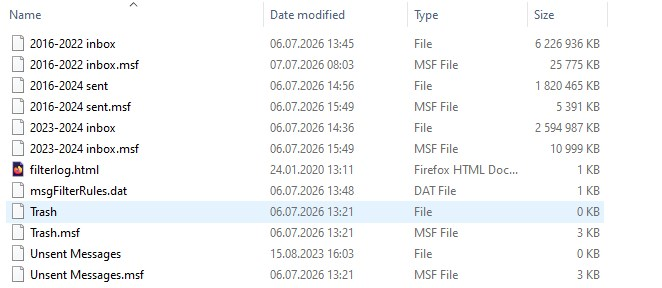
Content of that folder you can see on attached image. "2016-2022 inbox" is the name of one of local folders. If I want to move that folder to separated disc should I just move physically those two files which you see on the image? But what when I want to restore that folder in Thunderbird? One day I could be in situation when I need to find some old email and then I have to restore some folders.
If you have any advice for me, I will be glad. If not, I will try and see what's happening
Regards
The easiest approach is to install the addon, importexporttools NG. Then, highlight the folder to be exported, rightclick and select the importexport option to export mbox file . Repeat for each folder The msf files can be ignored.
To restore in the future, just use the same addon, highlight Local Folders, and rightclick and select the importexport option to import mbox files.