


moving folders, subfolders, and emails from one Tbird account to another Tbird account

I have an existing Tbird account for my Gmail emails. Have set up a new Tbird account for my Outlook email account. Would like to move all emails, including folders and subfolders, to my new Outlook Tbird account (with the intent of closing my Gmail account altogether).
Would appreciate learning the steps to ensure the emails, folders, and subfolders are moved from Tbird Gmail account to Tbird Outlook account
Tất cả các câu trả lời (6)
Try this:
- click file>offline>download to ensure all messages are downloaded
- click help>troubleshootinginformation
- rightclick and scroll to 'profile folder' and click 'open folder'
- exit thunderbird
- click the the imapmail\<IMAP account folder>
- COPY all desired folders to be uploaded and store in mail\Local Folders folder
- restart thunderbird and check that all folders are functional
- highlight one folder to be uploaded, rightclick, and select COPY to the desired Outlook account. (If the folder is huge, it may be prudent to copy small groups at a time, or to create a manual filter for this. IMAP was not designed for high volume uploads.)
- after the copy, check that the online folder is complete.
- repeat the two previous steps for each desired folder.
- after all have been uploaded, you may delete the Local Folders.
Thanks much for your help. Sorry, I'm not following completely: 1. I don't see the 'File' option anywhere 2. I don't see 'Help' anywhere 5. where will I find this imapmail\<IMAP account folder> ?
Thank you
'File' is on menu bar. click alt key to show it. Help is also there, and also on the hamburger menu. after completing step 4, the imapmail folder should be visible
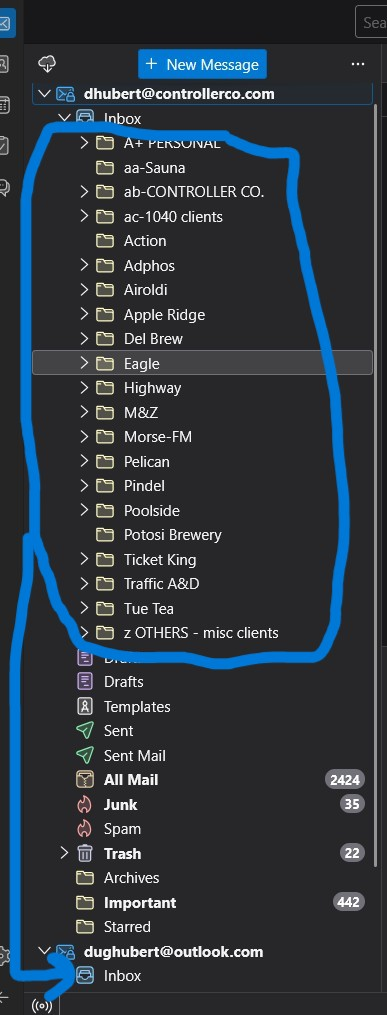
Thank you again. Ok, I am now in the midst of attempting #8; from Tbird, I copied a few of the folders from the Local Folders tree in Tbird, to fall under the Inbox of the new Outlook account in Tbird. And, while the folder names moved, the actual emails that were once within those Local Folders have been deleted somehow... maybe because Tbird went ONLINE???
(was getting notifications at bottom of Tbird screen saying 'xxx messages from FOLDERX were deleted'.)
Looks like the top half of the tree structure no longer contains the actual emails, but the bottom half still exist. Any insight?
Thanks for you help, and patience with me. I appreciate it.
Được chỉnh sửa bởi dough4 vào