


Windows 10 reached EOS (end of support) on October 14, 2025. If you are on Windows 10, see this article.

Tìm kiếm hỗ trợ

Tránh các lừa đảo về hỗ trợ. Chúng tôi sẽ không bao giờ yêu cầu bạn gọi hoặc nhắn tin đến số điện thoại hoặc chia sẻ thông tin cá nhân. Vui lòng báo cáo hoạt động đáng ngờ bằng cách sử dụng tùy chọn "Báo cáo lạm dụng".

Tìm hiểu thêm

Firefox Not Showing Pages in Search

  • 1 trả lời
  • 0 gặp vấn đề này
  • 167 lượt xem
  • Trả lời mới nhất được viết bởi Denys
  • Đã lưu trữ

This is a subtle problem. I used to be able to have pages listed in my search history. Now I can only have a search for that page listed. So I have to click on the search result in "Search Facebook" on desktop, click the search for the page in the search history and then click the page in the search results to get to the page. I don't have to do this for groups. Pages have a magnifying glass beside them which they never had before. When I click on any of these, I just get a list of results of searches for posts related to these pages, not the page itself. If I click a group, I go straight to the group with no list of posts. I logged out, cleared the cache and cookie but that didn't solve the issue.
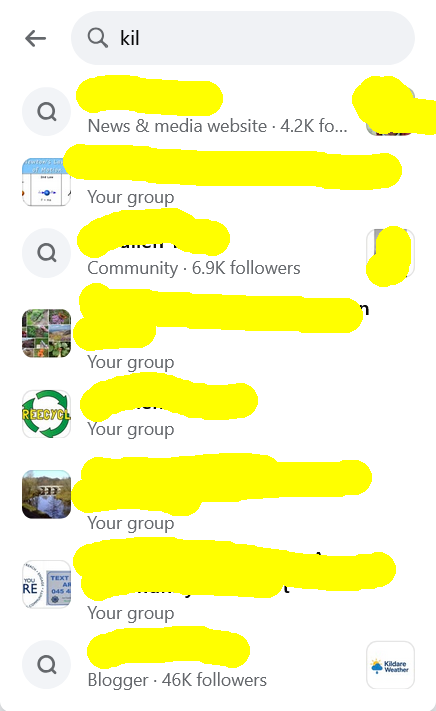
This is a subtle problem. I used to be able to have pages listed in my search history. Now I can only have a search for that page listed. So I have to click on the search result in "Search Facebook" on desktop, click the search for the page in the search history and then click the page in the search results to get to the page. I don't have to do this for groups. Pages have a magnifying glass beside them which they never had before. When I click on any of these, I just get a list of results of searches for posts related to these pages, not the page itself. If I click a group, I go straight to the group with no list of posts. I logged out, cleared the cache and cookie but that didn't solve the issue.
Đính kèm ảnh chụp màn hình

Tất cả các câu trả lời (1)

Hi,

This forum is intended to help users with Mozilla products, such as Firefox. As a moderator, I'm going to mark this thread as off-topic and lock the thread since it is not a subject covered in the support forum. Please see Mozilla Support rules and guidelines.