


Windows 10 reached EOS (end of support) on October 14, 2025. If you are on Windows 10, see this article.

Tìm kiếm hỗ trợ

Tránh các lừa đảo về hỗ trợ. Chúng tôi sẽ không bao giờ yêu cầu bạn gọi hoặc nhắn tin đến số điện thoại hoặc chia sẻ thông tin cá nhân. Vui lòng báo cáo hoạt động đáng ngờ bằng cách sử dụng tùy chọn "Báo cáo lạm dụng".

Tìm hiểu thêm

Thunderbird creates spam folder when I already have a junk folder (bug1985372)

  • 1 trả lời
  • 4 gặp vấn đề này
  • 271 lượt xem
  • Trả lời mới nhất được viết bởi Wayne Mery
  • Đã lưu trữ

I use Thunderbird desktop to access IMAP email from my hosting provider. My hosting provider includes a junk email folder named "Junk" with the path "...hosting.com/INBOX/Junk. I cannot delete this folder.

Whenever I run Thunderbird, it creates a second folder named "Junk" with the path "...hosting.com/INBOX/spam. If I right-click on this folder and delete it, it is re-created the next time I start Thunderbird. I have gone into "Junk Settings" unchecked the "Move new junk message to..." checkbox thinking that this is causing Thunderbird to mistakenly create an extra junk/spam folder but it continues to create that extra junk folder.

How do I stop this from happening? I should only require one junk/spam folder.
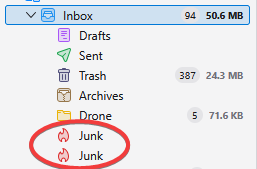
I use Thunderbird desktop to access IMAP email from my hosting provider. My hosting provider includes a junk email folder named "Junk" with the path "...hosting.com/INBOX/Junk. I cannot delete this folder. Whenever I run Thunderbird, it creates a second folder named "Junk" with the path "...hosting.com/INBOX/spam. If I right-click on this folder and delete it, it is re-created the next time I start Thunderbird. I have gone into "Junk Settings" unchecked the "Move new junk message to..." checkbox thinking that this is causing Thunderbird to mistakenly create an extra junk/spam folder but it continues to create that extra junk folder. How do I stop this from happening? I should only require one junk/spam folder.
Đính kèm ảnh chụp màn hình

Được chỉnh sửa bởi Wayne Mery vào

Tất cả các câu trả lời (1)

Please create a bug report at https://bugzilla.mozilla.org/enter_bug.cgi?product=thunderbird with details including your provider/domain name.