Windows 10 reached EOS (end of support) on October 14, 2025. If you are on Windows 10, see this article.

Tìm kiếm hỗ trợ

Tránh các lừa đảo về hỗ trợ. Chúng tôi sẽ không bao giờ yêu cầu bạn gọi hoặc nhắn tin đến số điện thoại hoặc chia sẻ thông tin cá nhân. Vui lòng báo cáo hoạt động đáng ngờ bằng cách sử dụng tùy chọn "Báo cáo lạm dụng".

Tìm hiểu thêm
Solved Đã lưu trữ

Multiple inboxes not displaying on "Unified Folders" - showing on "All Folders"

Rick đã trả lời
archlab-services

I have just set up Thunderbird with a handful of email accounts.

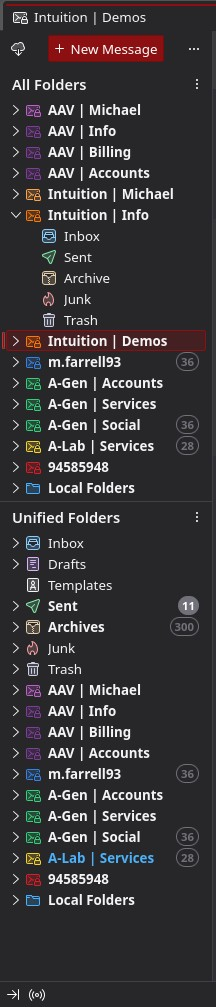
All inboxes show in the "All Folders" panel block, but when "Unified Folders" block is selected, the accounts prefixed "Intuition" fail to show in the panel. The Unified Inbox DOES receive mail from these hidden accounts, but this isn't really good enough as I need to be able to browse in to the folders within these accounts regularly.

Having both Unified and All views up is a workaround, but with 10+ accounts it takes up the full length of the screen when collapsed and is not the ideal setup.

I have deleted the folder index json and a couple of other internet-sourced tricks but to no avail.

Image attached - accounts prefixed "intuition" are the culprits!

I have just set up Thunderbird with a handful of email accounts. All inboxes show in the "All Folders" panel block, but when "Unified Folders" block is selected, the accounts prefixed "Intuition" fail to show in the panel. The Unified Inbox DOES receive mail from these hidden accounts, but this isn't really good enough as I need to be able to browse in to the folders within these accounts regularly. Having both Unified and All views up is a workaround, but with 10+ accounts it takes up the full length of the screen when collapsed and is not the ideal setup. I have deleted the folder index json and a couple of other internet-sourced tricks but to no avail. Image attached - accounts prefixed "intuition" are the culprits!

Tất cả các câu trả lời (2)

Giải pháp được chọn

If the Intuition accounts have only standard server folders (inbox, sent, drafts, trash, junk), then there is nothing to show outside the unified inbox, sent, etc. folders.