


Cannot compose message text in any color besides black

I updated to Thunderbird v.136 last month and lost the ability to customize the color of text when either creating a new message or replying to a received message.
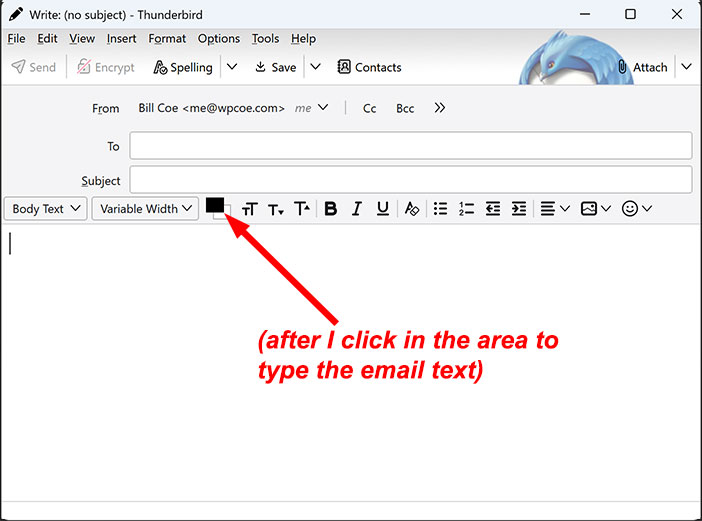
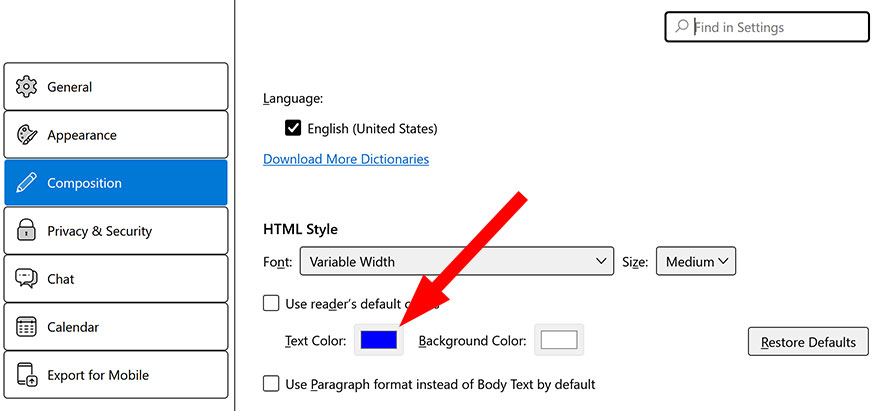
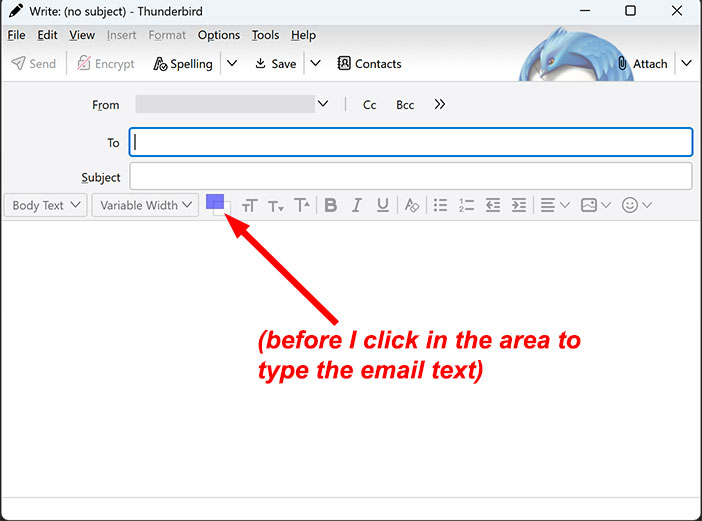
In Settings on the Composition screen under HTML Style, I select a blue color for Text Color but when I compose a message I only get black. Before I click in the area of the message to type text, the color box shows the blue color, but as soon as I click in the area to compose text, the color box changes immediately to black.
After I have typed that black text, if I select the text & click on the color box to change to color to blue (or any other color), the text stays black.
How can I have colored (non-black) text in messages I compose?

Giải pháp được chọn
In Settings/General/Lang. & Appearance, Colours, what do you have for 'Override the colours...'?
Tất cả các câu trả lời (4)
@sfhowes: Nothing in that thread fixes it for me.
Giải pháp được chọn
In Settings/General/Lang. & Appearance, Colours, what do you have for 'Override the colours...'?
sfhowes said
In Settings/General/Lang. & Appearance, Colours, what do you have for 'Override the colours...'?
Sorry for the delay, I didn't get a notification for your post, but <ding, ding, ding!> we have a winner. It was set (by default?) to Always. I changed it to Never, and I now can compose text in the color of my choice.
Many thanks! 🙏