


on screen language
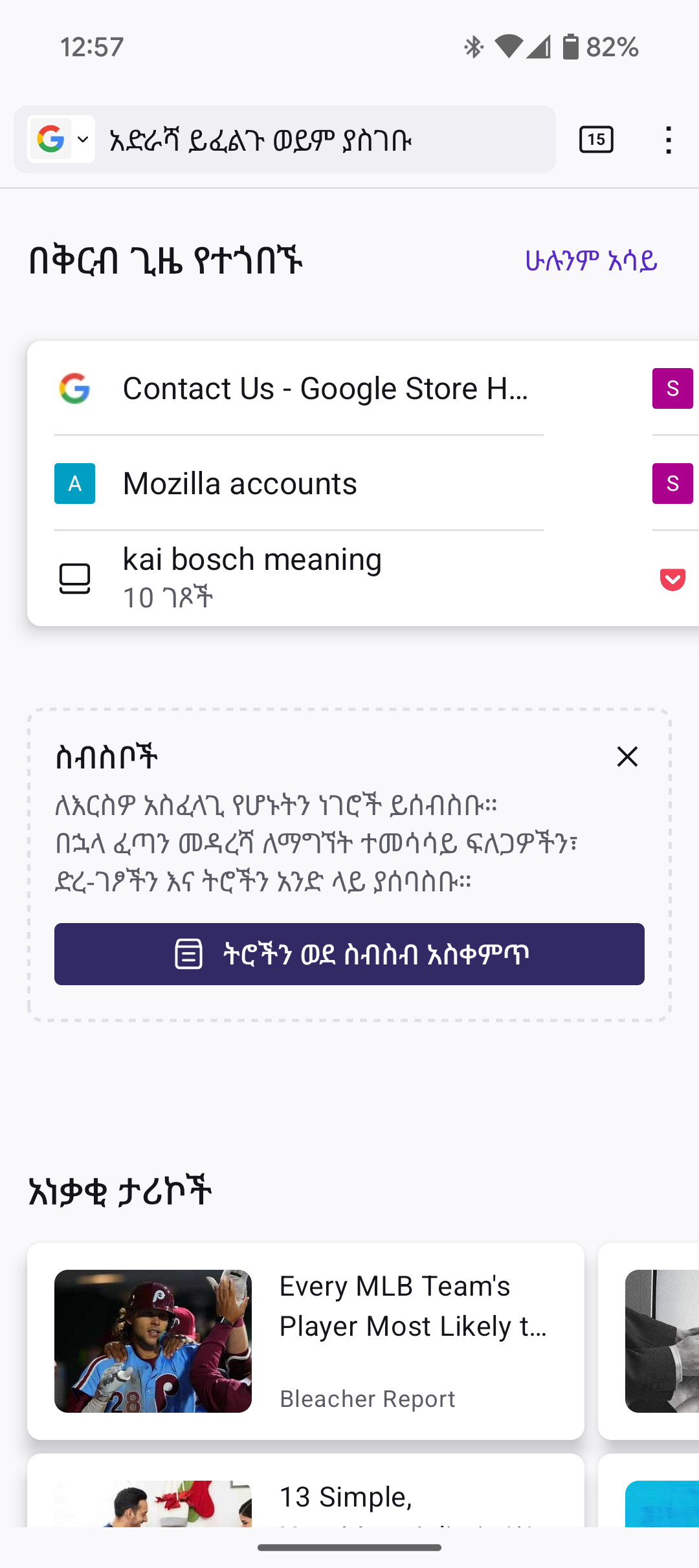
Where did this strange language come from? I synced my laptop to my Android phone and somehow this language started appearing English and another language I can't identify.
Giải pháp được chọn
It looks like the text in Firefox for Android has been changed to Amharic. I am going to try to walk you through this, very much best efforts, so please bear with me.
Tap the three dot icon and select ቅንብሮች (cog wheel icon)
This will open the settings menu. Next select ቋንቋ to open the Language menu.
Select the language at the top of the screen to take Firefox for Android back to using the device language.
(I have carefully done this on my own device to test it for you - it worked fine.)
I hope that this helps.
Đọc câu trả lời này trong ngữ cảnh 👍 1Tất cả các câu trả lời (5)
İn which language do you use your phone? İt might be changed due to a system bug or you had changed it by mistake.
I think that it is more likely that I changed it by mistake. But, of course, it could be a bug. I did go into settings and tried to find a fix but had no luck there.
Hi
Which language do you wish to use? We can help walk you through how to change it back.
English - American If you see from my screenshot, it's mixed in English and that other language I was referring to.
Giải pháp được chọn
It looks like the text in Firefox for Android has been changed to Amharic. I am going to try to walk you through this, very much best efforts, so please bear with me.
Tap the three dot icon and select ቅንብሮች (cog wheel icon)
This will open the settings menu. Next select ቋንቋ to open the Language menu.
Select the language at the top of the screen to take Firefox for Android back to using the device language.
(I have carefully done this on my own device to test it for you - it worked fine.)
I hope that this helps.