


Windows 10 reached EOS (end of support) on October 14, 2025. If you are on Windows 10, see this article.

Tìm kiếm hỗ trợ

Tránh các lừa đảo về hỗ trợ. Chúng tôi sẽ không bao giờ yêu cầu bạn gọi hoặc nhắn tin đến số điện thoại hoặc chia sẻ thông tin cá nhân. Vui lòng báo cáo hoạt động đáng ngờ bằng cách sử dụng tùy chọn "Báo cáo lạm dụng".

Tìm hiểu thêm
Solved Đã lưu trữ

Can You Somehow Merge a Sub-Folder from Folder A with a Same-name Sub-Folder in Folder B?

Rob Brownridge đã trả lời
Rob Brownridge

I'm helping my 80 year old father with quite a mess with his email.

He's been using Outlook for about 40 years, and back in 2021, his email service provider, Telus here in Canada, switched their email service over to Google Gmail, and long story short, the switchover from Telus' in-house email service to a Telus-branded Google email service ended up causing a real mess with my Dad's email, due to his main laptop's Outlook desktop application getting switched from IMAP to POP, whereas his Microsoft Surface remained Outlook IMAP, for the past 3.5 years, so they got totally out of sync from each other in some very complicated ways for which there seems no simple fix.

I offer that background just to perhaps explain what I'm about to ask.

In Thunderbird, if there is:

1) a Folder named "Alpha" with a bunch of Sub-Folders

2) a Folder named "Alpha New" with a bunch of Sub-Folders, many of which have the same names of the Sub-Folders within "Alpha" but many of the Sub-Folders having totally different names

and you want to amalgamate the Sub-Folders in the Folder "Alpha" with the Sub-Folders in the Folder "Alpha New,"

and for example you have:

1) a Sub-Folder named "Beta" within the Folder "Alpha"

2) a Sub-Folder named "Beta" within the Folder "Alpha New"

so you to drag "Beta" Sub-Folder from the Folder "Alpha" to the Folder "Alpha New,"

then what will happen?

I ask because in Gmail, it will present a dialogue saying you cannot do that because there is already a Label named "Beta" nested within the Label "Alpha New."

Will Thunderbird give a similar warning, or will it ask if you want to merge the two folders or something?

I'm helping my 80 year old father with quite a mess with his email. He's been using Outlook for about 40 years, and back in 2021, his email service provider, Telus here in Canada, switched their email service over to Google Gmail, and long story short, the switchover from Telus' in-house email service to a Telus-branded Google email service ended up causing a real mess with my Dad's email, due to his main laptop's Outlook desktop application getting switched from IMAP to POP, whereas his Microsoft Surface remained Outlook IMAP, for the past 3.5 years, so they got totally out of sync from each other in some very complicated ways for which there seems no simple fix. I offer that background just to perhaps explain what I'm about to ask. In Thunderbird, if there is: 1) a Folder named "Alpha" with a bunch of Sub-Folders 2) a Folder named "Alpha New" with a bunch of Sub-Folders, many of which have the same names of the Sub-Folders within "Alpha" but many of the Sub-Folders having totally different names and you want to amalgamate the Sub-Folders in the Folder "Alpha" with the Sub-Folders in the Folder "Alpha New," and for example you have: 1) a Sub-Folder named "Beta" within the Folder "Alpha" 2) a Sub-Folder named "Beta" within the Folder "Alpha New" so you to drag "Beta" Sub-Folder from the Folder "Alpha" to the Folder "Alpha New," then what will happen? I ask because in Gmail, it will present a dialogue saying you cannot do that because there is already a Label named "Beta" nested within the Label "Alpha New." Will Thunderbird give a similar warning, or will it ask if you want to merge the two folders or something?

Tất cả các câu trả lời (2)

Giải pháp được chọn

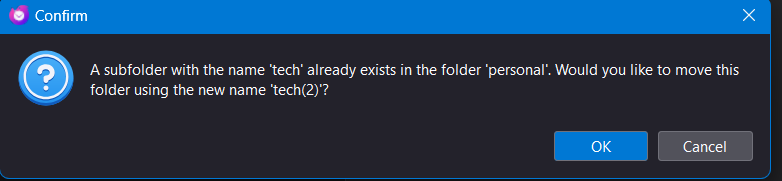
If you attempt to move a folder to a folder with the same named subfolder, you get a prompt similar to Gmail's. See attached.
Great to know, thanks!