


Windows 10 reached EOS (end of support) on October 14, 2025. If you are on Windows 10, see this article.

Tìm kiếm hỗ trợ

Tránh các lừa đảo về hỗ trợ. Chúng tôi sẽ không bao giờ yêu cầu bạn gọi hoặc nhắn tin đến số điện thoại hoặc chia sẻ thông tin cá nhân. Vui lòng báo cáo hoạt động đáng ngờ bằng cách sử dụng tùy chọn "Báo cáo lạm dụng".

Tìm hiểu thêm

Keyboard shortcut to hide quick filter bar

  • 3 trả lời
  • 0 gặp vấn đề này
  • 135 lượt xem
  • Trả lời mới nhất được viết bởi pshenkin1
  • Đã giải quyết

In Thunderbird v115, pressing Ctrl+Shift+K (in Windows) displays the Quick Filter bar (if it's not currently visible). However, the same shortcut does not hide or toggle the display of the Quick Filter bar. It can be hidden by navigating through the menus to find the option and unchecking it, but it might be more intuitive and convenient to have the same keyboard shortcut toggle the display of the filter bar instead of only displaying it. Or perhaps a small "X" icon at the right edge of the toolbar could be added to allow hiding it using the mouse.

In Thunderbird v115, pressing Ctrl+Shift+K (in Windows) displays the Quick Filter bar (if it's not currently visible). However, the same shortcut does not hide or toggle the display of the Quick Filter bar. It can be hidden by navigating through the menus to find the option and unchecking it, but it might be more intuitive and convenient to have the same keyboard shortcut toggle the display of the filter bar instead of only displaying it. Or perhaps a small "X" icon at the right edge of the toolbar could be added to allow hiding it using the mouse.

Giải pháp được chọn

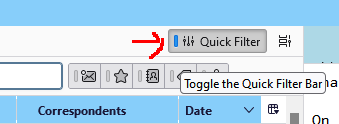
If the Message List Header is enabled in View/Layout, there is a button to toggle the QFB (see picture).
Đọc câu trả lời này trong ngữ cảnh 👍 0

Tất cả các câu trả lời (3)

Giải pháp được chọn

If the Message List Header is enabled in View/Layout, there is a button to toggle the QFB (see picture).

Thanks!

Được chỉnh sửa bởi swbrains vào

Just press Esc once or twice to close Quick Filter bar