


Delete an Email Account

TB 92.12.0 (32-bit) Win11 (64-bit)
Unable to delete an email account. Several 2021 replies on this forum specify that "Account Actions" is the route to take. No Account Actions in email settings.
Another suggestion was to right-click the 3 bars on the right. Same result.
Another suggestion was to remove entries in pref*.js files. There are 5 files with entries {pref.js pref_1.js pref_2.js pref_9.js pref_10.js}, each one with what looks like 7-8 entries related to the account to be deleted. The tags are "user_pref("mail.identity.id1" and all user_pref tags seem to be unique and sequentially numbered. I don't know what effect deleted the account will have on Thunderbird.
How can I delete an account. None of the answers, above, seem to be the way to go. thanks
Tất cả các câu trả lời (5)
Giải pháp được chọn
'Account Actions' is on the same pane as account settings and appears just below the Outgoing SMTP servers section.
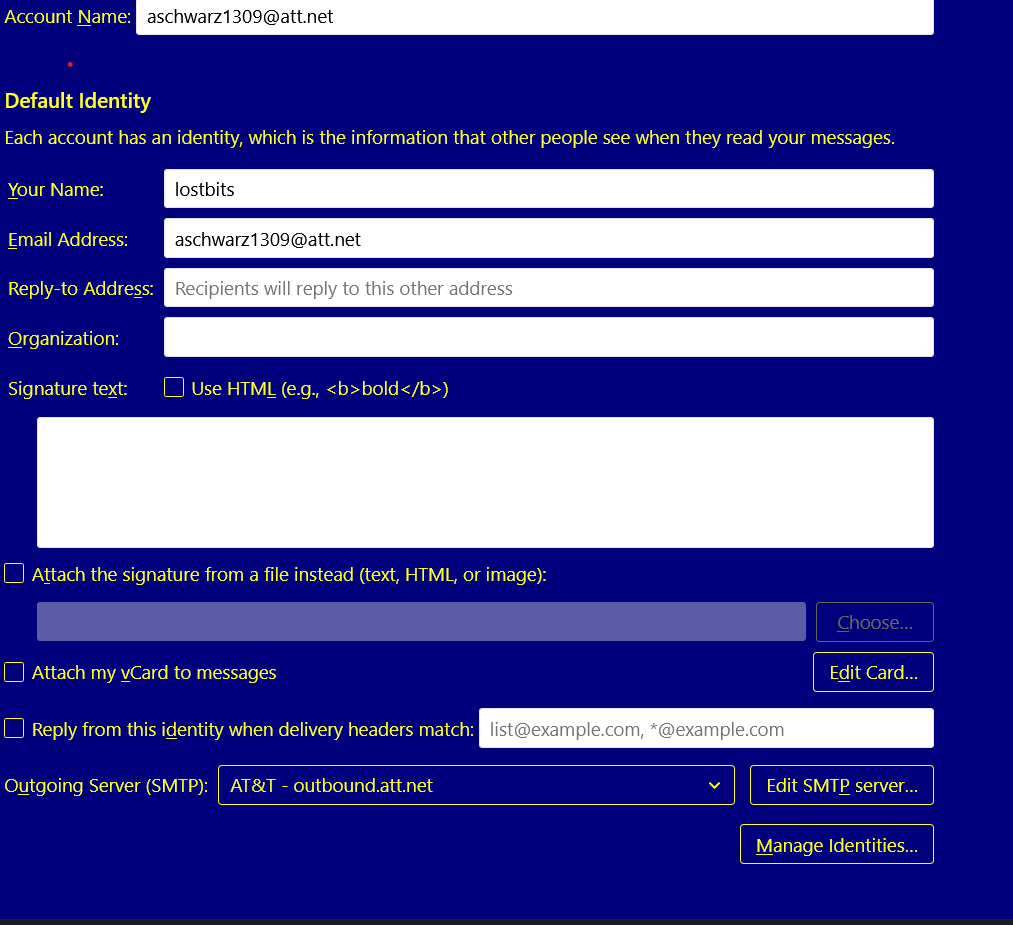
I've included a screen shot of the first page of the Account Settings. Below the Outgoing Server (SMTP) I do not see Account Actions. Same result in Server Settings. Likewise for Edit SMTP Server and Manage Identities.
What am I missing?
As I said, it's on the Account Settings page, below the Outgoing Server SMTP entry. See attached.
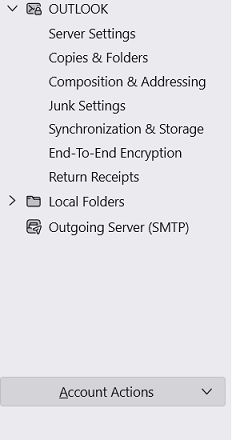
@david I'd be embarrassed if I was bashful. I missed the Account Actions on the left menu pull down. Thanks. Worked great. Problem solved. And I am embarrassed.
Don't be. I routinely forget where various components are stored. Many menus have same name. I rarely respond to questions without first checking to ensure I know the answer. :) Thanks for the smile.