


Google Services font weight bold issue.
Since January 2020, I'm facing a font weight issue with all Google Services wherein everything is BOLD, I uninstalled all extensions but the issue still persists.

Tất cả các câu trả lời (6)
Maybe a font that looks bold is used.
You can right-click and select "Inspect Element" to open the builtin Inspector with this element selected.
You can check in the Rules tab in the right panel in the Inspector what font-family is used for selected text. You can check in the Font tab in the right panel in the Inspector what font is actually used because Firefox might be using a different font than specified by the website.
Hey, thanks for the response. I'm a developer myself but I don't think this is the problem. I have also observed that this surely happens when I refresh a youtube video if it isn't already bold. PFA
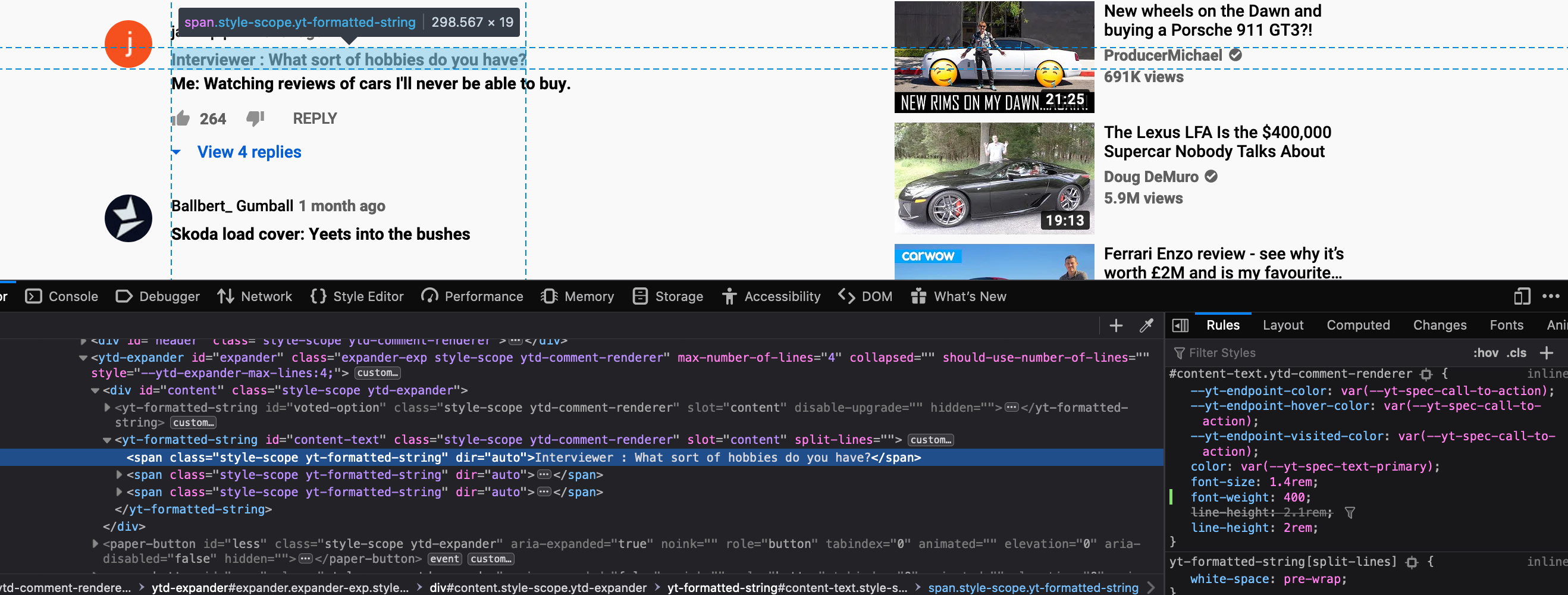
You need to open the Fonts tab in the right panel to see what font Firefox is using.
It's Roboto Bold in the above case when it should just be Roboto.
I think this is a similar issue although the solution doesn't seem to work for me. https://support.mozilla.org/en-US/questions/1233884
I can confirm now that the occurs whenever Roboto font is used. Firefox renders it as Roboto Bold for some reason. Can you help me with that? Also, I'm on Mac OS Catalina