


Windows 10 reached EOS (end of support) on October 14, 2025. If you are on Windows 10, see this article.

Tìm kiếm hỗ trợ

Tránh các lừa đảo về hỗ trợ. Chúng tôi sẽ không bao giờ yêu cầu bạn gọi hoặc nhắn tin đến số điện thoại hoặc chia sẻ thông tin cá nhân. Vui lòng báo cáo hoạt động đáng ngờ bằng cách sử dụng tùy chọn "Báo cáo lạm dụng".

Tìm hiểu thêm
Đã lưu trữ

Google Calendar will not print, even in Private Window.

Rehlyt đã trả lời
Rehlyt

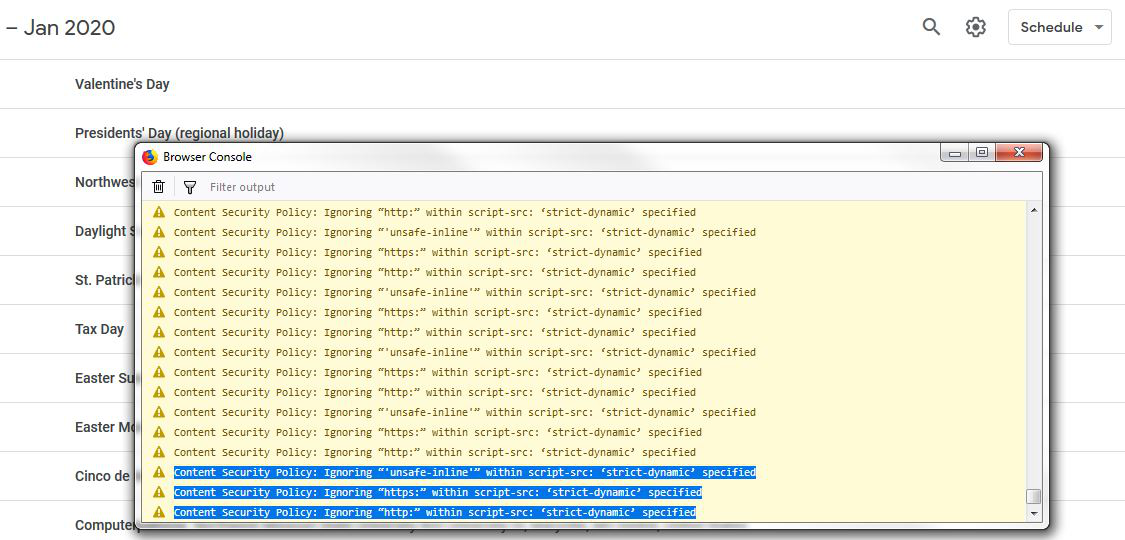
We can not get Google Calendar to print when we click the gear icon at the top and select print. The first dialogue box will pop up, but when we click print it does nothing. The log shows multiple lines of this:

Content Security Policy: Ignoring “'unsafe-inline'” within script-src: ‘strict-dynamic’ specified Content Security Policy: Ignoring “https:” within script-src: ‘strict-dynamic’ specified Content Security Policy: Ignoring “http:” within script-src: ‘strict-dynamic’ specified

How can we fix this? I have found no solution anywhere.

We can not get Google Calendar to print when we click the gear icon at the top and select print. The first dialogue box will pop up, but when we click print it does nothing. The log shows multiple lines of this: Content Security Policy: Ignoring “'unsafe-inline'” within script-src: ‘strict-dynamic’ specified Content Security Policy: Ignoring “https:” within script-src: ‘strict-dynamic’ specified Content Security Policy: Ignoring “http:” within script-src: ‘strict-dynamic’ specified How can we fix this? I have found no solution anywhere.

Tất cả các câu trả lời (3)

Here is a screenshot.
What if you tried Chrome?

Yeah, it works fine in other browsers. That isn't the point. My back office prefers to use the Firefox browser, and I just find it surprising that Mozilla does not have a fix for this.