


After transfering Thunderbird data from old PC to new PC, local data is not shown on new PC

I followed exactly the description in "https://support.mozilla.org/en-US/kb/moving-thunderbird-data-to-a-new-computer". My user profiles are properly available on the new PC, but the local data is from the old PC is not shown in the new PC. Instead the new PC only shows under local folders only the Trash and unsent messages, not the received and sent mails.
The local folder still directs to the mailbox address from the old PC "mailbox:///C:/Users/.../Documents/Thunderbird/Profiles/oaj5rqfq.default/ImapMail/imap.web.de/Empfangen"
and is not using the "....ksuebwuu.default" Profiles ID from the new PC.
Can you help me getting the local data from the old PC also shown in the new PC?
Giải pháp được chọn
Good to hear all is now ok.
Tất cả các câu trả lời (6)
Just to be clear 'Local Folders' is a special mail account, so I do not think you are talking about that account.
Please post 3 images showing the following: Contents of :
- Appdata/Roaming/Thunderbird folder
- Appdata/Roaming/Thunderbird/Profiles folder
- In 'Thunderbird' folder there will be a 'profiles.ini' file; open it using Notepad or Wordpad, post an image showing the contents.
Many thanks for checking this issue, Toad-Hall!
Please see the uploaded 3 images.
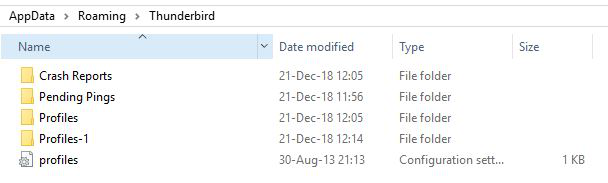
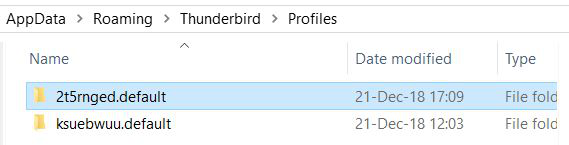
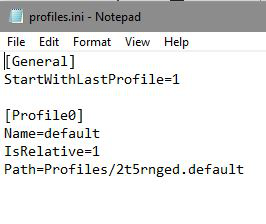
one more hint: Please also see image of my "Local folder" (sorry for the German language)
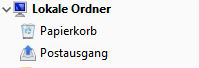
Check this: right click on 'Lokale Ordner' / Local Folders mail account in Folder Pane and select 'Settings' 'Local directory:' click on 'Browse' button make sure you select the correct directory. eg: C:\Users\User account name\Appdata\Roaming\Thunderbird\Profiles\2t5rnged.default\Mail\Local Folders
click on 'OK' Restart Thunderbird.
Many thanks again, Toad-Hall! Using above advice, I could solve the issue.
Giải pháp được chọn
Good to hear all is now ok.