


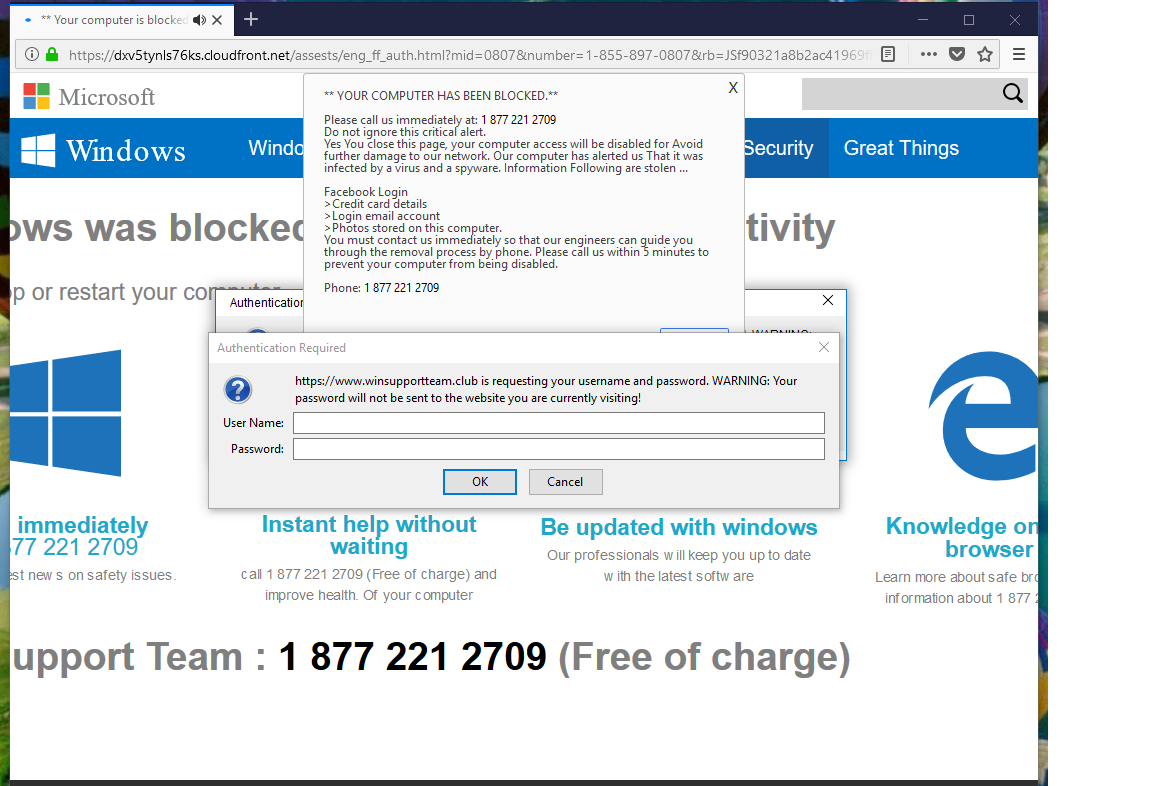
Firefox hijacked: YOUR COMPUTER HAS BEEN BLOCKED

Hi - I'm unable to load Firefox because the home screen is hijacked. I've run the free Malwarebytes and it finds nothing. I've used CCleaner as well. I've loaded a print screen. Any help will be much appreciated.
Doug
Giải pháp được chọn
Hi Doug, to cancel the authentication dialog, try tapping the Esc key several times quickly to break the reload cycle. After that, you should be able to close the tab using Ctrl+w, or press Alt+Home to navigate to your home page. Does that work in this case?
Đọc câu trả lời này trong ngữ cảnh 👍 2Tất cả các câu trả lời (8)
Please use more than 1 scanner as each uses diff tech :
Save your Report and google each before deleting anything as do not want to delete something you need, If need help :
Uninstall any Bittorrent apps, uninstall cracked programs and delete cracks then Post in only 1 forum, then wait.
Should go for help at Malwarebytes. Or use the Support after using this Very powerful program : https://www.bleepingcomputer.com/download/roguekiller/ Please let us know if this solved your issue or if need further assistance.
Grab a copy of your Profile and stick on Desktop.You want out of this your bookmarks since can not start Firefox :
- bookmarks and history: places.sqlite
- bookmark backups: compressed .jsonlz4 JSON backups in the bookmarkbackups folder
When things are normal the usual way is this :
- https://support.mozilla.org/en-US/kb/export-firefox-bookmarks-to-backup-or-transfer
- https://support.mozilla.org/en-US/kb/back-and-restore-information-firefox-profiles
If have to since have copy of the Profile now you can uninstall Firefox and Delete the Profile in it's location as well as in : C:\Program Files , C:\Program Files(x86) & C:\ProgramData if they remain, uninstall the Maintenance Package also.
Reinstall with a Full Version Installer from here :
Please let us know if this solved your issue or if need further assistance.
Giải pháp được chọn
Hi Doug, to cancel the authentication dialog, try tapping the Esc key several times quickly to break the reload cycle. After that, you should be able to close the tab using Ctrl+w, or press Alt+Home to navigate to your home page. Does that work in this case?

A way out of a trap page is to (force it if needed) Close Firefox. Wait about 20 seconds for Firefox to finish closing. Right-click on the Firefox icon and select Open New Window. +++++++++++++++++++++++++++++++++ Sometimes this works. If it opens, close it by Menu > File > Exit. This will flush out that web page from the Session Store.
Doug8765 said
Hi - I'm unable to load Firefox because the home screen is hijacked. I've run the free Malwarebytes and it finds nothing. I've used CCleaner as well. I've loaded a print screen. Any help will be much appreciated. Doug
Hi to everyone who sent a solution. It seems that the first time I ran CCleaner and Malwarebytes, that nothing changed. I don't know what changed, but while the browser was up with the message "YOUR COMPUTER HAS BEEN BLOCKED" I ran CCleaner and Malwarebytes again and then used the Task Manager to kill Firefox. Then when I ran Firefox again, it ran without problem.
That was very good work. Well done. Please flag your last post as Solved Problem so others will know.
FredMcD said
That was very good work. Well done. Please flag your last post as Solved Problem so others will know.
Thanks FredMcD. How do I find that "Solved Problem" button? I don't see it in the thread.
Doug
Go to your https://support.mozilla.org/en-US/questions/1231149#answer-1148267 response and click the 'solved' link to its right.