


Issue with tasks

-I open the tasks window -I create a name by typing anything in: "click here to add a new task" -I try to type what i have to do in the panel under category | Mark Completed | Priority but no text appears..
Giải pháp được chọn
delicacy said
"I try to type what i have to do in the panel under category | Mark Completed | Priority but no text appears.. " -Which means the content of the task under the title cannot be created..
And this is where you completely loose me. I double click the newly created task. A dialog opens. with lots of options.
But I just do not follow why your would be creating a category of completed. That goes down further under status. However, I type complete into the dialog and press enter. The text appears in the list as selected.
At any time I can click into the description at the bottom and type whatever I want.
Tất cả các câu trả lời (4)

I type where the text says Click here to add a new task. I press the enter key and the task appears below.
Does this not work for you?
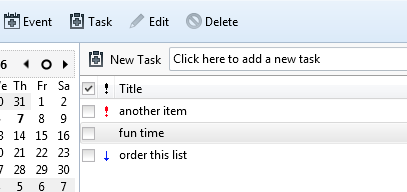
You don't read me well..
"I create a name by typing anything in: "click here to add a new task" -Which means the title is already created..
"I try to type what i have to do in the panel under category | Mark Completed | Priority but no text appears.. " -Which means the content of the task under the title cannot be created..
Giải pháp được chọn
delicacy said
"I try to type what i have to do in the panel under category | Mark Completed | Priority but no text appears.. " -Which means the content of the task under the title cannot be created..
And this is where you completely loose me. I double click the newly created task. A dialog opens. with lots of options.
But I just do not follow why your would be creating a category of completed. That goes down further under status. However, I type complete into the dialog and press enter. The text appears in the list as selected.
At any time I can click into the description at the bottom and type whatever I want.
"I double click the newly created task. A dialog opens. with lots of options."
-i didn't know the panel under the title wasn't on edit mode & that i had to double click to open a text edition window.
-Fixed.