


Firefox always crashes on startup

Firefox always crashing on startup, even in safe mode. Have tried refreshing program; removing and performing fresh install; and scanning for viruses and malware. Nothing corrects problem. Crash reporter unable to submit report.
Firefox version is 43.0.1 OS is 32-bit Windows XP.
Tất cả các câu trả lời (2)

Do you have nvidia's network access manager or forceware network manager software installed? Disable / remove it.
Start your Computer in safe mode with networking. Then start Firefox. Try Safe web sites. Is the problem still there?
Starting The Computer In Safe Mode;
Free Online Encyclopedia
While in safe mode,
In the address bar, type about:crashes<enter>. Note: If any reports do not have BP in front of the numbers/letters, click it and select Submit.
The crash report is several pages of data. We need the report numbers to see the whole report.
Using your mouse, mark the most resent 7 - 10 crash reports, and copy them. Now go to the reply box below and paste them in.
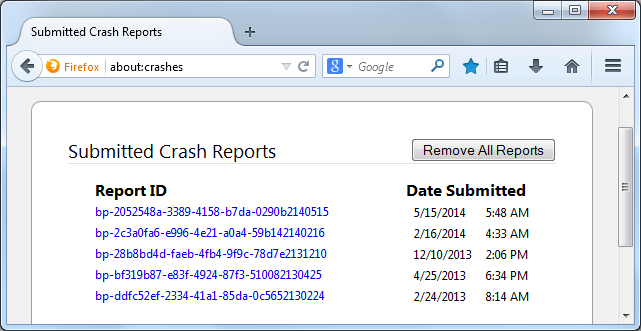
If you can't get Firefox to open, you will have to do this the hard way. https://support.mozilla.org/en-US/kb/mozillacrashreporter Open the file browser / explorer on your computer. Note: You may have to enable Show Hidden Folders / Files. Enter this in the address bar;
Windows: %APPDATA%\Mozilla\Firefox\Crash Reports\submitted Win 7/Vista: C:\Users\<username>\AppData\Roaming\Mozilla\Firefox\Crash Reports\submitted Win XP/2000: C:\Documents and Settings\<username>\Application Data\Mozilla\Firefox\Crash Reports\submitted
Mac OS: /Users/<username>/Library/Application Support/Firefox/Crash Reports/submitted Linux: /home/<username>/.mozilla/firefox/Crash Reports/submitted
Copy the last 5-7 Recent File Names in the folder. Post the information in the reply box below.
Giải pháp được chọn
hi, please go into the programs section of your system control panel and uninstall nvidia forceware network access manager in case you have that present.