


Most used website page only one row because of new gear at top

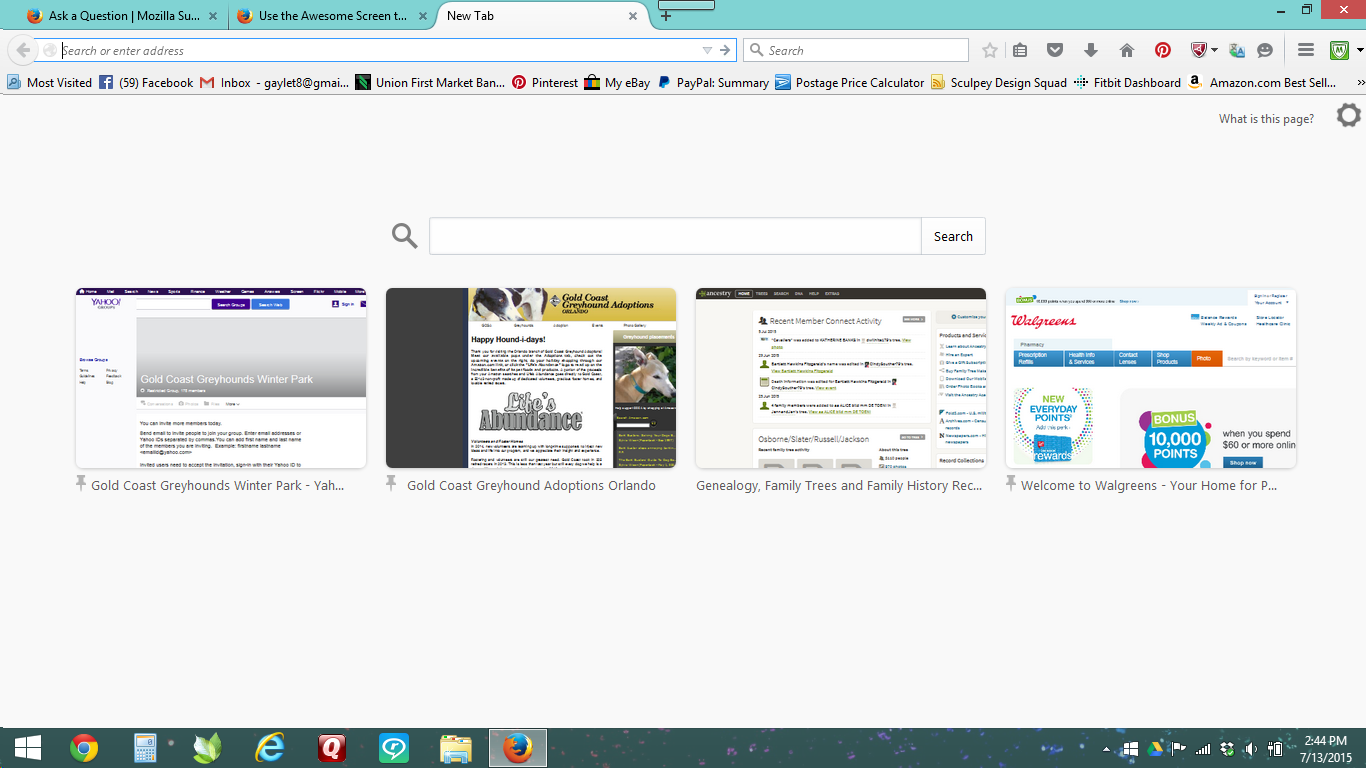
I used the "Awesome" page as my home page. It had my 8 most used websites on it in 2 rows of 4. After the latest update, I can only see 4 websites because the gear at the top of the page moves everything down and there is no longer room for 2 rows. Is there a setting or something I can change to get both rows to show again?
Tất cả các câu trả lời (2)
Giải pháp được chọn
That page has a complicated construction, but you can use custom style rules to modify it. In particular, you can let the thumbnail area grow to occupy the full space available and, if necessary or desired, to have a scroll bar.
I haven't completely worked out what style rules make the most sense, and not sure I will have time during the day today.
If you are interested in an add-on solution, this one has been mentioned several times on the forum: https://addons.mozilla.org/firefox/addon/new-tab-tools/
gaylet8 said
I used the "Awesome" page as my home page. It had my 8 most used websites on it in 2 rows of 4. After the latest update, I can only see 4 websites because the gear at the top of the page moves everything down and there is no longer room for 2 rows. Is there a setting or something I can change to get both rows to show again?
Thanks! I will try the Add-On.