


Increasing frequency of sites not fully compatible with Firefox

We have been using Firefox for a long time as our default browser. Recently (last 6 months +-) we have been encountering links in some websites that do not function in Firefox, but work fine with other browsers (Chrome, Edge). First noticed it with Wunderground Weather Underground after a Firefox update. Some aspects of the site simply did not work on our laptops. Since then we have encountered a number of other websites that have clickable links that do not work with Firefox, but work fine with other browsers.
We are losing confidence, to the point of considering switching default browsers.
Are others having the same issues, and what is Mozilla/Firefox planning to do to remedy these sorts of issues?
ప్రత్యుత్తరాలన్నీ (1)
I just checked that website and it works OK in Firefox.
Can you provide more detailed steps to reproduce?
You can also try Firefox Troubleshoot Mode to see if the problem goes away. Firefox Troubleshoot Mode is a special diagnostic mode that temporarily turns off hardware acceleration, disables add-ons and resets some settings. See the Use Troubleshoot Mode in Firefox article for details.
If Firefox is open, you can restart in Firefox Troubleshoot Mode from the Help menu:
- Click the menu button
 , click Help, select Troubleshoot Mode and click Restart in the "Restart Firefox in Troubleshoot Mode?" dialog that opens.
When the Firefox Troubleshoot Mode window appears, select "Open".
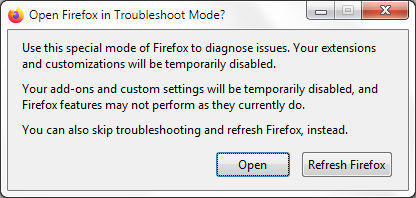
If the issue is not present in Firefox Troubleshoot Mode, your problem is probably caused by an extension. Please follow the steps in the Troubleshoot extensions, themes and hardware acceleration issues to solve common Firefox problems article to find the cause.
When you figure out what's causing your issues, please let us know. It might help others with the same problem.