


Logging on to utility website to pay a bill at alagasco.com through email with firefox does not show the lock for security, and switching to widows explorer ok

it shows the lock through all of the process with IE and does not show it using firefox...Help
All Replies (3)
Your Firefox may have the address stored as http://www.alagasco.com instead of https://www.alagasco.com. When I enter alagasco with https, I get the lock icon.
If this helps, then remove the address http://www.alagasco.com (i.e. the one without https) , so that it will not get in the way anymore, following the procedure, described here:
Remove websites from the address bar suggestions
It is a good practice to let Firefox select automatically https connection, if such exists, regardless of what has been entered before. See the add-on https-everywhere
Modified by smo
Thanks, I tried your suggestion to no avail...It shows locked until you go to pay screen..and then shows unlocked. (attached pic of result).. tried another website banking...same result.
I am assuming that it is firefox because doing the same on different websites with IE it shows locked (secure) switching to different screens on same website.
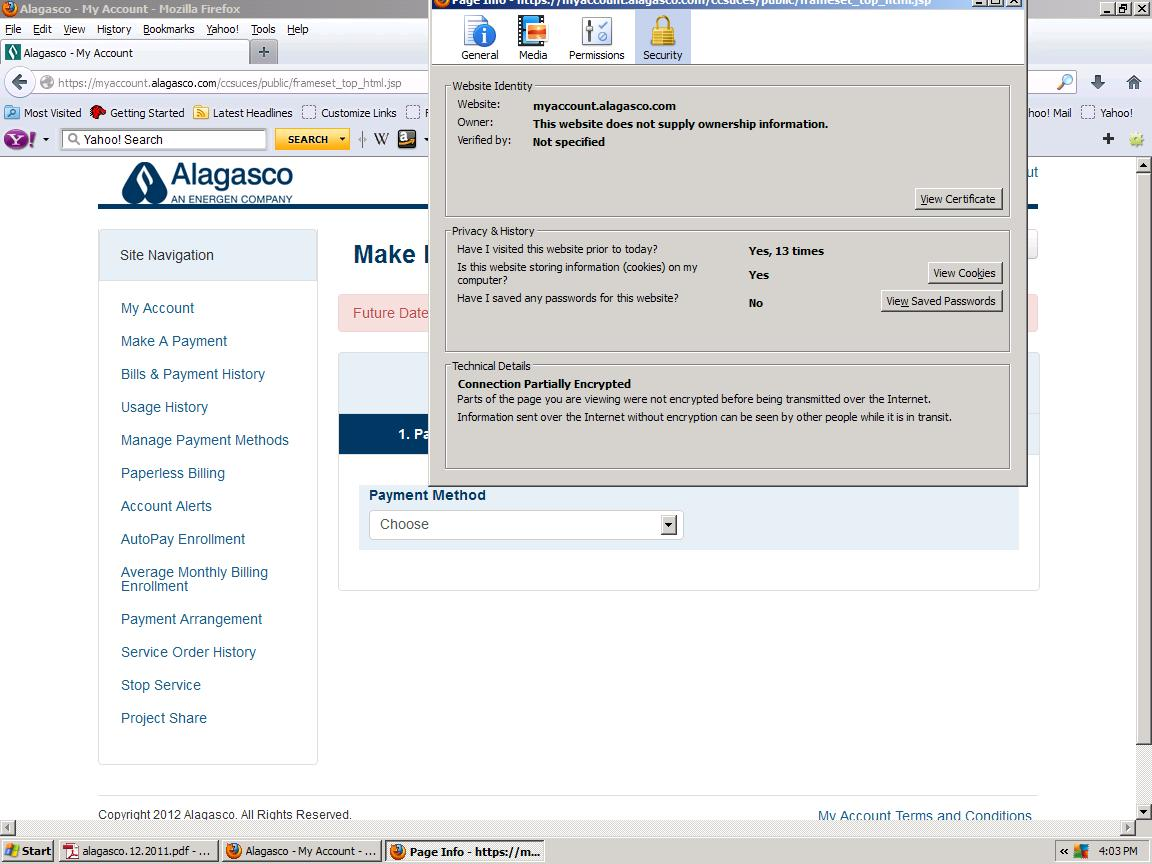
There is mixed content on that web page (i.e. some is coming via an unencrypted http connection).
Firefox doesn't show the padlock in such a case.