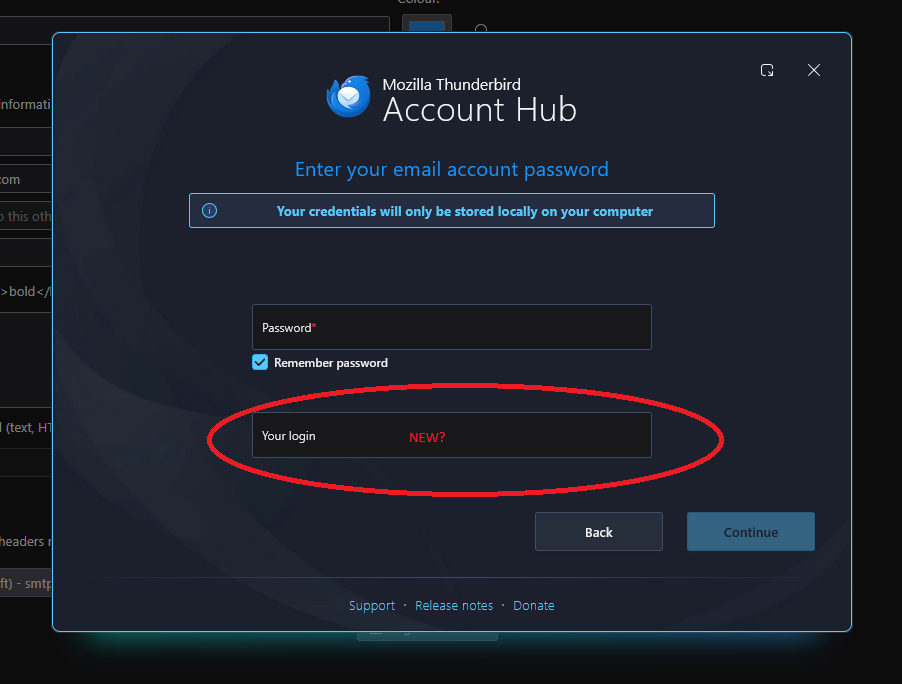
Need urgent help setting up problematic IMAP account Please?

Trying to setup Thunderbird for wife’s new laptop… Her 4 separate email accounts with auto setup for the IMAP server info without issues. One account however will not – VERY frustrating as this works fine on her old laptop. Thunderbird setup now appears to have an extra (4th) field required when setting up the account: Usually, its just name, email address and password. I see there’s now an extra box titled ‘Your Login’ being required for auto login. I have no idea what this field should be set to. Also, when I attempt to do a manual setup for the account, the port numbers and server names shown on the internet are completely different to those used on auto, and still get rejected. Doesn’t help that MS trying (and succeeding) to confuse us with all this “Outlook vs Outlook Classic vs Outlook.com”. My wife is unable to continue her work until I get this sorted:-( PLEEEAAASE can someone help me setup this xxxxxxx@outlook.com email account in Thunderbird as an IMAP account?