


Firefox 4 is unable to load Lotus Domino Web Access email.

I use Firefox (both Mac and PC versions) for remote access of company email through Lotus Domino Web Access. After updating both versions to 4.0, I get the same warning message that the server is unable to process my request when I try to view my emails. Any suggestions?
Alla svar (11)
$HaikuForm - 401.3 Mozilla/5.0 (Windows NT 6.1; rv:2.0) Gecko/20100101 Firefox/4.0
03/24/2011 04:45:45PM A problem has occurred which may have caused the current operation to fail. 03/24/2011 04:45:45PM uncaught exception: [Exception... "Component returned failure code: 0x80040111 (NS_ERROR_NOT_AVAILABLE) [nsIDOMHTMLDocument.createElementNS]" nsresult: "0x80040111 (NS_ERROR_NOT_AVAILABLE)" location: "JS frame :: https://.../iNotes/Forms85.nsf/iNotes/Proxy/?OpenDocument&Form=l_StdPageOperations_Gecko&l=en&gz&CR&MX&TS=30101020T153425,75Z&charset=UTF-8&PresetFields=s_FullmailView;1,s_FullListViewVirtual;1,s_mailView;1,s_Base;1,s_FullInit;1,s_Sametime;1 :: CyB :: line 15" data: no] 03/24/2011 04:45:45PM : 0
I fixed mine by installing the Remote XUL Manager then adding my Notes domain to the whitelist.
Downloaded remote xul manager.... don't know how to find whitelist... when/if I get there, don't know how to add lotus.. unless it's obvious
@redcanine menu: Tools -> Remote XUL Manger.
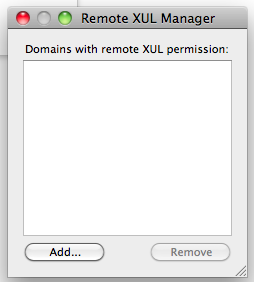
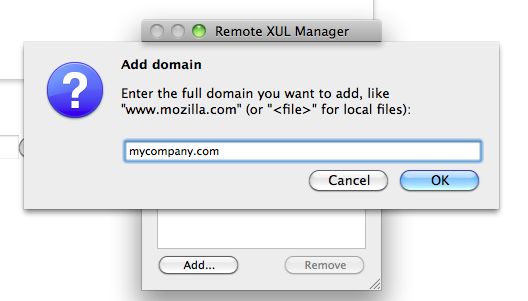
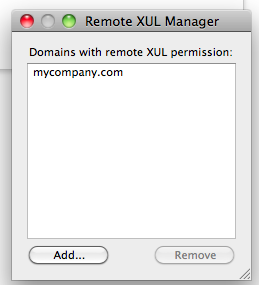
If your Notes remote email is http://something.mycompany.com then click ADD in the popup box and enter e.g. mycompany.com then click OK. You should now see this listed in the whitelist. Pictures below are from OSX but it works the same in Windows.
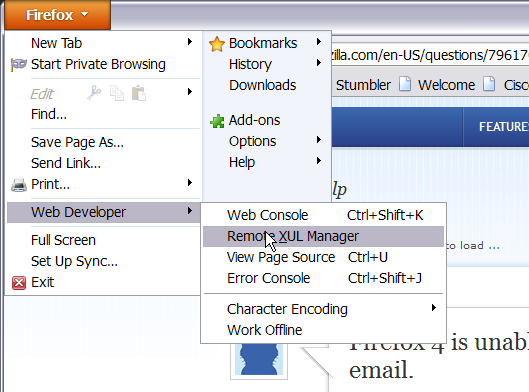
In the Windows version with menu bar turned off you can find it under the Web Developer menu...
Thanks. After downloading the XUL Manager, I found it in "Tools" on the menu bar. Clicked it. Up came the Remote XUL Manager box. I then copied the lotus notes address of my email from the address bar. Clicked the add button on the XUL Manager box. The Add Domain popup box appeared, then I pasted in the box my email address, then clicked...ok.
When I did this my company's email address appeared in the whitelist box. I closed the XUL Manager. I logged out of notes. Logged in again. And my mail opened. Thanks. I'd been working on this issue for five hours.
Thanks a lot. It works fine. Now I can read my company mail located on Lotus Notes Domino server.
Thank you the Remote XUL Manager fix worked great. However there is now an issue in Firefox 5. I'm not sure if it's entirely related. The Console shows the following error when I try to reply to an email.
Domino Release 8.5.2FP2 (AIX) $HaikuForm - 401.8 Mozilla/5.0 (Windows NT 6.1; rv:5.0) Gecko/20100101 Firefox/5.0
06/27/2011 11:34:32AM A problem has occurred which may have caused the current operation to fail. 06/27/2011 11:34:32AM uncaught exception: [Exception... "Security error" code: "1000" nsresult: "0x805303e8 (NS_ERROR_DOM_SECURITY_ERR)" location: "http://xx.xx.xx.xx/iNotes/Forms85.nsf/iNotes/Proxy/?OpenDocument&Form=l_StdPageOperations_Gecko&l=en&gz&CR&MX&TS=20110126T215428,03Z&charset=ISO-8859-1&PresetFields=s_stdedit;1 Line: 3"] 06/27/2011 11:34:32AM : 0
in internet explorer rss feeds work fine without problem just spoils everything firefox
firefox does experymenty and spoil a reputation
@redcanine
I found it by going to Firefox > Web Developer > Remote XUL Manager
Then copy/paste the website domain you are having trouble with, for example domino2.xxxxx.com or whatever. Add it to the whitelist. You should be good to go after that.
Ändrad av bk12321