


Search bar suggestions from my history still showing

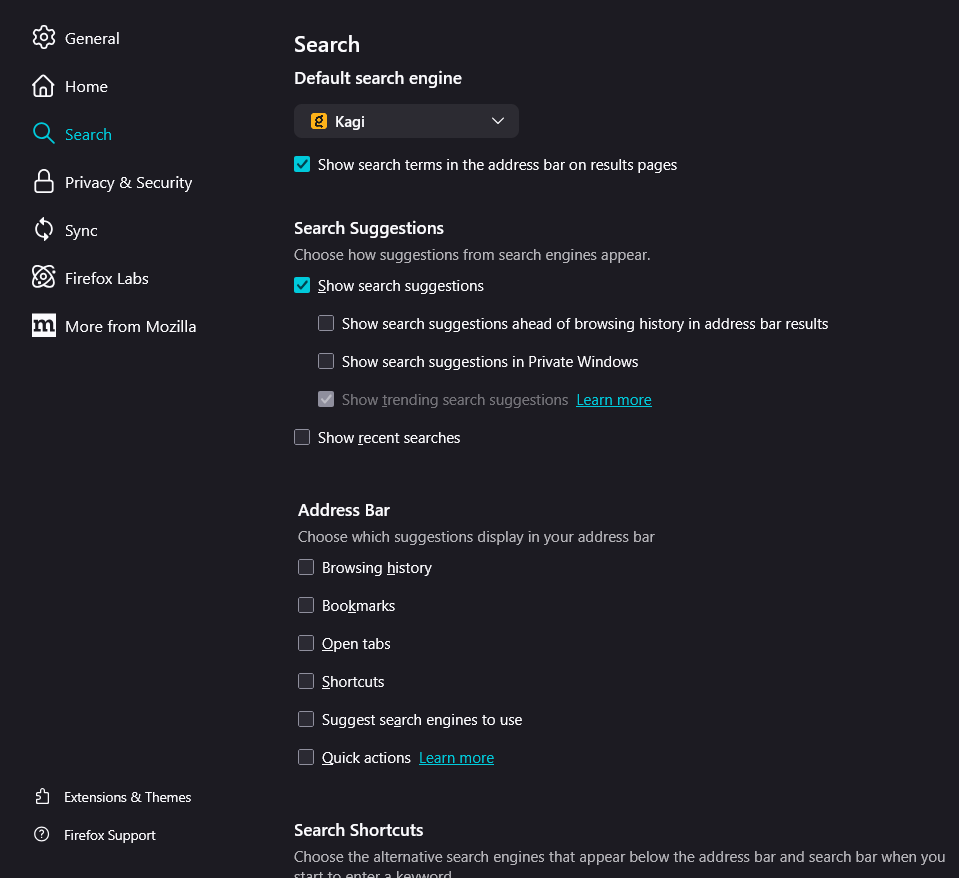
So, I configured the suggestions in the search bar so that nothing from my history/previous searches is displayed (see attached image with current settings). However, suggestions from my past searches still continue to appear. I would like only the autocomplete suggestions from my search engine to appear (I'm using Kagi). I already tried to delete my browsing history (Crtl + Shift + Delete - Everything, browsing and download history), it deleted everything but my past searches... Can somebody help me?
Thanks! attachments: (search suggestions settings, search suggestions appearing now)

Alla svar (1)

"If it has the little clock icon (Search & Form History), you should be able to remove it using the keyboard: down arrow to select it and then Shift+Delete to flush it." I took this from https://old.reddit.com/r/firefox/comments/1go866a/deleting_history_doesnt_delete_search_history/lwmm13k/
You could additionally try clearing Saved Form Info in the Clear Browsing Data section, that might include previous searches.