


Can not send emails from Thunderbird

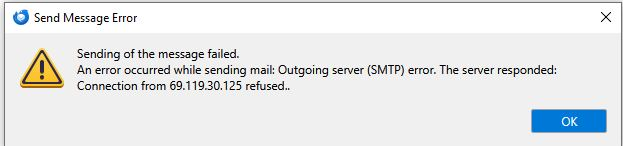
Using Thunderbird 140.5.0esr (64-bit) email program, can not send emails. Get message: Sending of the message failed. An error occurred while sending mail: Outgoing server (SMTP) error. The server responded: Connection from 69.119.30.125 refused. Have multiple email accounts - all get same response. Have tried several computers -all get same response. Can receive emails with no problem. I have spent several hours with my service provider [Optimum] checking/changing Server settings to no avail. They claim all my settings are correct and say the problem is not on their end. On the Optimum website email – I can send emails with no problem. I installed Outlook and set it up to the same servers and can send emails from there so it would seem Thunderbird is the problem.
Running WIN10 on 1 machine, WIN11 on another. Both same issue

Alla svar (2)
Two issues: first, you might want to try mail.optimum.net, 465, SSL/TLS, for the outgoing server.
https://www.optimum.net/FAQ/#/answers/a_id/216
Second, make sure each account is sending on its separate smtp server with the User Name matching the email address of the sending account:
1. Tried Port 465 and SSL/TLS - does not work. Tried several other ports & different security settings during my support interaction with cable company.
2. Each account has been set that way for 10+ years. It just stopped working 11/24.