


I command firefox to quit, but I have to use Force Quit to make it occur.

Browser Firefox 29.0, OS X 10.8.5 I can no longer Quit Firefox and have it happen. When I try to shut down the computer, up comes a message saying I must first close Firefox. Then I use Finder>Applications>Firefox icon and then click on Apple, pick the troublesome application (Firefox 29.0) and choose Force Quit. This is rather irksome as well as cumbersome.
Zgjidhje e zgjedhur
See at the top right side. There must be a pointer like the image. It is called Menu.
Lexojeni këtë përgjigje brenda kontekstit 👍 1Krejt Përgjigjet (6)

For closing firefox, please go to Menu then click on the turn off icon pointing in the screenshot. After that, firefox will surely close. Let us know, if you need to close forcely after this!
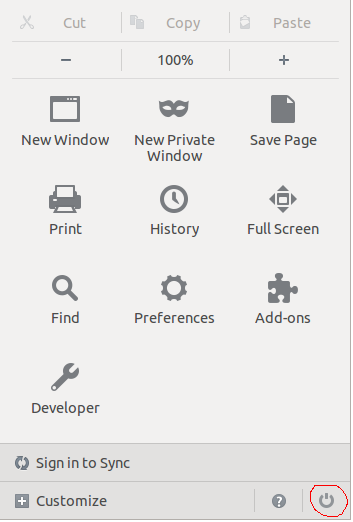
Thank you, but where is Menu? I clicked all the topics next to Firefox at the very top of my screen like file, edit, view, etc. and there was no menu mentioned.
Zgjidhja e Zgjedhur
See at the top right side. There must be a pointer like the image. It is called Menu.

I have this problem, too, and I can't find a solution. Ever since I installed Firefox 29 on my Mac OS X 10.9.2 machine, I find it often hangs after I quit it. I usually quit using Command+Q.
I've tried several things. I've started Firefox in safe mode and yet still run into the problem. I've uninstalled (including a sudo uninstall of every firefox and mozilla file or directory on my machine) and reinstalled, and yet the problem keeps coming back.
The problem with the above solution (if indeed it solves the problem) is that there's now no keyboard shortcut for quitting Firefox on Mac.
I note you have already started your own question on this thank you
- see Frequently need to force quit Firefox 29 AFTER Command+Q /questions/1002156
I will close this question as it is already solved.