


How do I recover the normal additional toolbar in firefox that shows options for maps, images, videos etc
How do I recover the normal additional toolbar in firefox that shows options for maps, images, videos etc. This toolbar is no longer shown on firefox - perhaps it's because firefox has recently been updated and no longer gives that facility?
Krejt Përgjigjet (10)

That sounds like the separate Search bar, which newer Firefox versions hide by default in favor of searching from the address bar. You can bring it back in a few steps:
1. Click the menu button (the three horizontal lines in the top-right corner) and choose Settings. 2. On the left side, click Search. 3. Under "Search bar", select "Add search bar in toolbar".
The search bar should appear next to the address bar right away. If you would rather keep searching from the address bar, you can still choose your default search engine on that same Settings page, and clicking the magnifying glass icon in the address bar shows the one-click search engine options.
Robert, Many thanks for "Search bar", select "Add search bar in toolbar".your reply. I had no problem with your steps 1 and 2. However for 3 (having got into Search), I could not find "Search bar", in order to select "Add search bar in toolbar"..
Under Default Search Bar (eptbsrchege), it shows 'Show search terms in the address bar on results pages' and this is already ticked.
Then comes a list of additional search engines. Then there's one for search engine suggestions where ' Show search suggestions before browsing history in address bar results' is ticked. Then a list of Firefox suggestions - all ticked. Then nothing else except Dismissed suggestions.
So I can't find "Search bar", select "Add search bar in toolbar". Am I missing something? Or not doing this properly?
Regards, Jeremy

Jeremy, you could try the following.
right-click UI buttons near the toolbar until you see the option "Customise Toolbar".
Click it and you should be taken to a customisation page.
If the search bar is amongst the available options then you can drag it to the toolbar, or alternatively right-click it and select one of the pin options.
Ndryshuar nga TechHorse
TechHorse, Many thanks for trying to help me with this. Although I found 'Customise Toolbar' easily as you suggested and then the customisation page, 'Search Bar' was not among the available options. There was an option for 'Search', with a magnifying glass icon, but this was just an additional search facility that can be dragged onto the top tool bar, duplicating the one that's already there. And that doesn't give me the horizontal list of maps, images, videos etc.
At 83 I find this all very difficult, so I guess my next step will be to take my laptop into my local computer shop and get them to do it. However, I'm most grateful to you for trying to help.
Regards, Jeremy
Jeremy, I am not 100% sure which toolbar you are referring to. Do you perhaps mean the Bookmarks Toolbar?
To test this, once again right-click UI buttons until you see a "Bookmarks Toolbar" submenu, and then within this menu click "Always Show".
Alternatively, you can toggle the Bookmarks Toolbar shown / hidden state by pressing Ctrl+Shift+B.
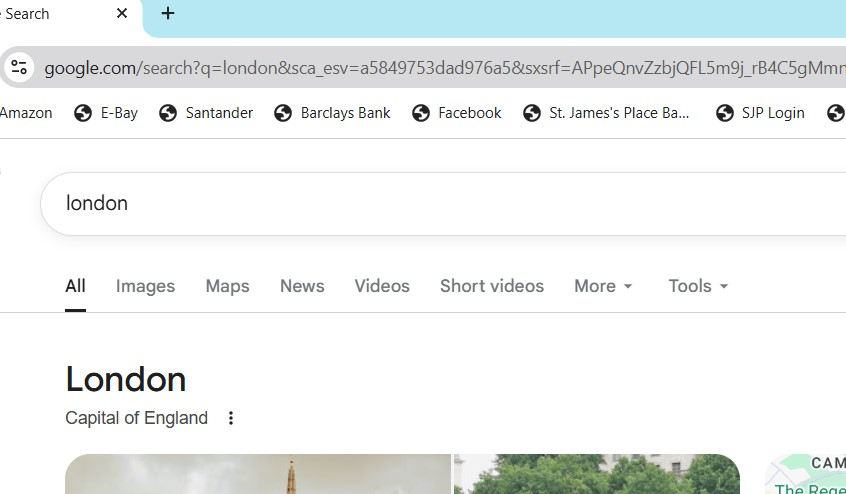
TechHorse, Thanks again for this. Please see the two uploaded images below. First you can see a screen shot of what I can see using Google Chrome. This clearly shows you the tool bar I am trying to restore back onto my Firefox browser. It has the one with options for 'all, maps, news, videos, more' etc.
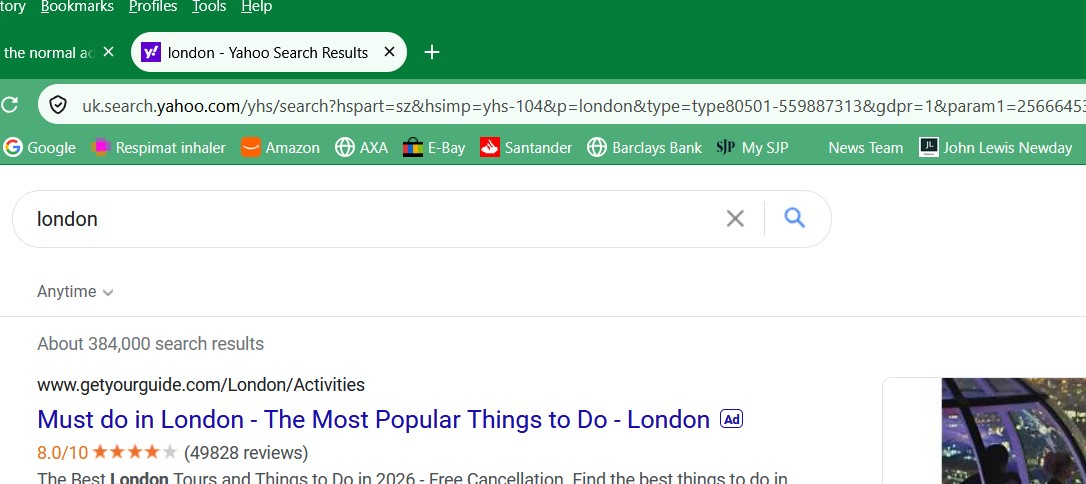
Then you can see the screenshot of what I can see using my Firefox browser. This no longer gives me the toolbar i want back - with all, maps, news etc. But it still shows my bookmarks toolbar (which appears on both versions).
I hope that helps. Regards , Jeremy
Jeremy, unfortunately I am not able to view the screen shots. This is a problem at my end. Sorry about that, and hopefully someone else can take a look.
However, from your description it sounds as if you are referring to the links that appear on a Google results page, rather than something built into Firefox itself?
If you perform a Google search does the results page show the options list that you are missing?
But again, hopefully someone else can take a look at the posted images.
Yes, it's a matter of content in the actual page. The "expected" image shows Google search results. The "unwanted" screen is however of Yahoo search result page.
If you perform a Google search in Firefox instead of Yahoo (either by setting it your default search provider, or by changing the engine used from the dropdown of the toolbar input you use to trigger it), do the result show what you expect then?
jbr,
Many thanks for this. I can see that if whilst using Firefox I click on Google from my bookmarks, I can then see the toolbar I need with 'all, maps, images, news etc..... All I need to know now is how to have Firefox always open wit the Google search facility.
Regards,
Jeremy
This guide: Manage Firefox search settings has the steps to follow. Hopefully it will be just that.
(It's also plausible a rogue addon has been hijacking your searches to point them to yahoo for advertising revenue purposes, so that might be a little more involved… but let's try the easy way in Settings for now…)