"Authentication failure" with Gmail Oauth login (Linux/Nixos)

Thunderbird for NixOS nixos - 1.0
I could not figure out how to provide a log at all. If there is a way, please let me know and I will provide one.
Whenever I try to log in with gmail, I get stuck on this dead end:
- Set up gmail server config (because my email ends in @vcu.edu, however I have tested this with a proper @gmail.com email and observed the exact same behavior)
- Get propted to login with google, which works
- Get to the "Mozilla Thunderbird Email wants access to your Google Account" page, select all and hit continue
- get redirected to `http://localhost:35141/?state=<string of chars>&iss=https://accounts.google.com&code=<another string of chars>&scope=https://mail.google.com/%20https://www.googleapis.com/auth/carddav%20https://www.googleapis.com/auth/calendar` This page does not load, I just get a "unable to connect" error
- get a notification stating "Authentication failure while connecting to server `imap.gmail.com`
- get ANOTHER prompt to log in with google, exact same thing happens
please note that the port is random and is different every single time. also, google does not register that I have allowed Thunderbird access to my account, and it prompts me again every single time. Open ports: ``` sudo ss -lntup [sudo] password for jane: Netid State Recv-Q Send-Q Local Address:Port Peer Address:Port Process udp UNCONN 0 0 192.168.122.1:53 0.0.0.0:* users:(("dnsmasq",pid=2224,fd=5)) udp UNCONN 0 0 0.0.0.0%virbr0:67 0.0.0.0:* users:(("dnsmasq",pid=2224,fd=3)) udp UNCONN 0 0 0.0.0.0:33289 0.0.0.0:* users:(("librewolf",pid=185950,fd=164)) udp UNCONN 0 0 0.0.0.0:35410 0.0.0.0:* users:(("librewolf",pid=185950,fd=161)) udp UNCONN 0 0 0.0.0.0:52393 0.0.0.0:* users:(("librewolf",pid=185950,fd=218)) udp UNCONN 0 0 0.0.0.0:21027 0.0.0.0:* users:(("syncthing",pid=1850,fd=19)) udp UNCONN 0 0 0.0.0.0:54112 0.0.0.0:* users:(("syncthing",pid=1850,fd=33)) udp UNCONN 0 0 0.0.0.0:5353 0.0.0.0:* users:(("avahi-daemon",pid=1148,fd=11)) udp UNCONN 0 0 0.0.0.0:41088 0.0.0.0:* users:(("librewolf",pid=185950,fd=169)) udp UNCONN 0 0 0.0.0.0:59247 0.0.0.0:* users:(("librewolf",pid=185950,fd=132)) udp UNCONN 0 0 [::]:44815 [::]:* users:(("syncthing",pid=1850,fd=29)) udp UNCONN 0 0 *:1716 *:* users:((".kdeconnectd-wr",pid=185637,fd=15)) udp UNCONN 0 0 [::]:21027 [::]:* users:(("syncthing",pid=1850,fd=34)) udp UNCONN 0 0 [::]:5353 [::]:* users:(("avahi-daemon",pid=1148,fd=12)) udp UNCONN 0 0 *:22000 *:* users:(("syncthing",pid=1850,fd=15)) tcp LISTEN 0 4096 127.0.0.1:8384 0.0.0.0:* users:(("syncthing",pid=1850,fd=17)) tcp LISTEN 0 32 192.168.122.1:53 0.0.0.0:* users:(("dnsmasq",pid=2224,fd=6)) tcp LISTEN 0 4096 127.0.0.1:8080 0.0.0.0:* users:(("systemd",pid=1,fd=847)) tcp LISTEN 0 4096 127.0.0.1:631 0.0.0.0:* users:(("cupsd",pid=1814,fd=4),("systemd",pid=1,fd=997)) tcp LISTEN 0 50 *:1716 *:* users:((".kdeconnectd-wr",pid=185637,fd=16)) tcp LISTEN 0 4096 [::1]:631 [::]:* users:(("cupsd",pid=1814,fd=8)) tcp LISTEN 0 4096 *:22000 *:* users:(("syncthing",pid=1850,fd=21)) ```
I believe this is all the information i can provide. Firewall was disabled for testing. I cannot log into either my school or personal gmail accounts.
Krejt Përgjigjet (2)

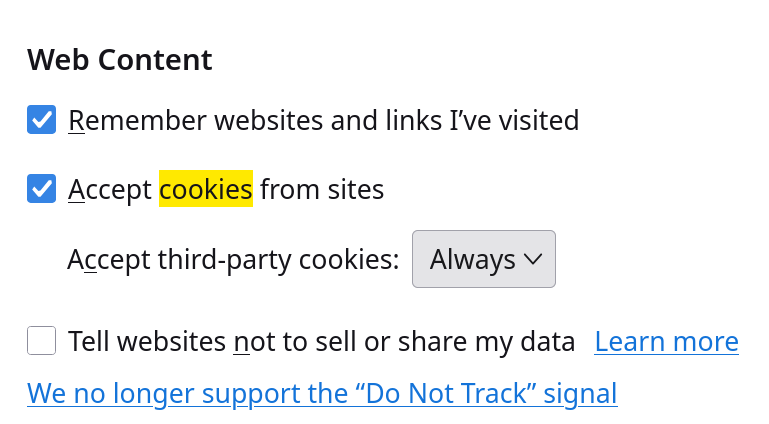
If this is something peculiar to Nix, I can't address or troubleshoot that. But those general symptoms happen in other OSs when cookies are disabled in Thunderbird. See <Settings | Security & Privacy | Web Content> and make sure "Accept cookies from sites" is enabled.
Zgjidhja e Zgjedhur
Lin said
If this is something peculiar to Nix, I can't address or troubleshoot that. But those general symptoms happen in other OSs when cookies are disabled in Thunderbird. See <Settings | Security & Privacy | Web Content> and make sure "Accept cookies from sites" is enabled.
It is, there is also nothing marked as "blocked", nor are there any cookies stored.
HOWEVER, just to prove my point I tried logging in with google chrome instead of LibreOffice, and that time it worked. Strange, but I only have to login once so I don't mind.