


Windows 10 reached EOS (end of support) on October 14, 2025. If you are on Windows 10, see this article.

Kërkoni te Asistenca

Shmangni karremëzime gjoja asistence. S’do t’ju kërkojmë kurrë të bëni një thirrje apo të dërgoni tekst te një numër telefoni, apo të na jepni të dhëna personale. Ju lutemi, raportoni veprimtari të dyshimtë duke përdorur mundësinë “Raportoni Abuzim”.

Mësoni Më Tepër

No message found

  • 4 përgjigje
  • 0 e kanë hasur këtë problem
  • Përgjigjja më e re nga johne53

Whenever I try to search my various emails for some text, at least 40% of the time it shows me the attached message. I'm on Version 149.0.1 but it's been happening ever since I installed Thunderbird (maybe 4 or 5 months ago?) My first move is to check that I haven't mis-spelled the word I'm looking for (which I usually haven't) and I definitely know that the word is valid for one or more emails. So why does this message keep appearing?

Previously I'd been running an old 32-bit version of Thunderbird (which I don't have installed any more) but I don't remember ever seeing this with the older version.
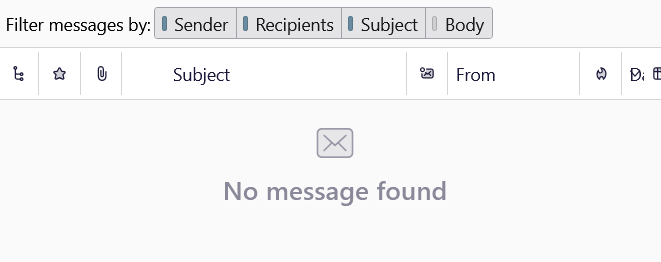
Whenever I try to search my various emails for some text, at least 40% of the time it shows me the attached message. I'm on Version '''149.0.1''' but it's been happening ever since I installed Thunderbird (maybe 4 or 5 months ago?) My first move is to check that I haven't mis-spelled the word I'm looking for (which I usually haven't) and I definitely know that the word is valid for one or more emails. So why does this message keep appearing? Previously I'd been running an old 32-bit version of Thunderbird (which I don't have installed any more) but I don't remember ever seeing this with the older version.
Foto të bashkëngjitura ekrani

Krejt Përgjigjet (4)

Disable your Quick Filter bar and you'll be able to see the messages in your thread pane...

Oops... I've been trying to post a screenshot but it won't let me for some reason. I'll try again later.

Ndryshuar nga johne53
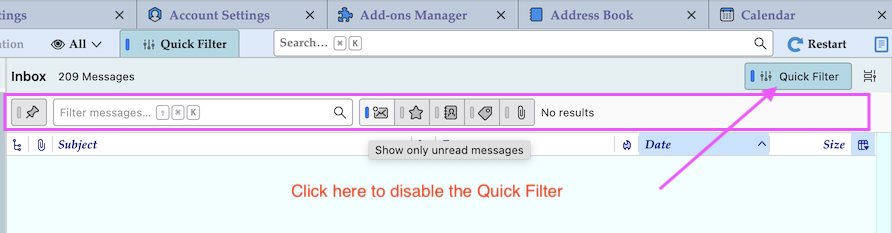
Follow instruction in my screen shot

Apologies - after disabling my Quick Filter I was still seeing a very similar message but after closing Thunderbird and re-launching, it's now working as expected (I'll add to this thread if either of the messages returns...)

Thanks for your help @Mapenzi

Bëni një pyetje

Duhet të bëni hyrjen te llogaria juaj që t’i përgjigjeni postimeve. Ju lutemi, filloni me një pyetje të re, nëse s’keni ende një llogari.