


Windows 10 reached EOS (end of support) on October 14, 2025. If you are on Windows 10, see this article.

Kërkoni te Asistenca

Shmangni karremëzime gjoja asistence. S’do t’ju kërkojmë kurrë të bëni një thirrje apo të dërgoni tekst te një numër telefoni, apo të na jepni të dhëna personale. Ju lutemi, raportoni veprimtari të dyshimtë duke përdorur mundësinë “Raportoni Abuzim”.

Mësoni Më Tepër
Arkivuar

UI boxes too small for content

cwinte replied
cwinte

I had a problem with an account so Login to SMTP was failing. At this time all dialog boxes were too small to read or even see the text impute area for the password. This was a newly (re)created account inTB. It worked fine to download but would not send. [I eventually solved/worked around this by using a different login name.] However the UI problem is probably still there to be a problem for others. The first "Sending message" box was too small, about 1/4 the normal size I expect, but could be resized if you were quick enough. The Error message and Password Entry boxes would be overlaid and both too small to read content or see the buttons or text entry fields. They could not be resized.
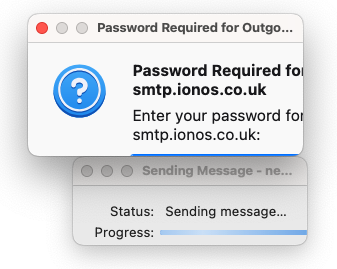
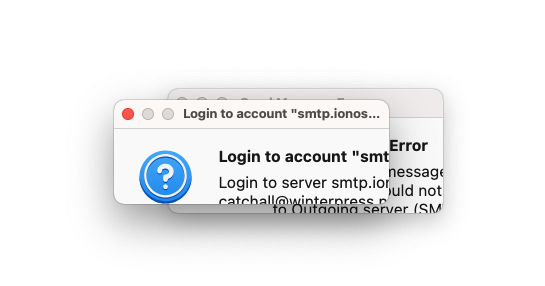
I had a problem with an account so Login to SMTP was failing. At this time all dialog boxes were too small to read or even see the text impute area for the password. This was a newly (re)created account inTB. It worked fine to download but would not send. [I eventually solved/worked around this by using a different login name.] However the UI problem is probably still there to be a problem for others. The first "Sending message" box was too small, about 1/4 the normal size I expect, but could be resized if you were quick enough. The Error message and Password Entry boxes would be overlaid and both too small to read content or see the buttons or text entry fields. They could not be resized.
Foto të bashkëngjitura ekrani

Krejt Përgjigjet (1)

PS I saw this in ESR 143 and latest 144.0.1 that I installed & tried.