


Windows 10 reached EOS (end of support) on October 14, 2025. For more information, see this article.

Kërkoni te Asistenca

Shmangni karremëzime gjoja asistence. S’do t’ju kërkojmë kurrë të bëni një thirrje apo të dërgoni tekst te një numër telefoni, apo të na jepni të dhëna personale. Ju lutemi, raportoni veprimtari të dyshimtë duke përdorur mundësinë “Raportoni Abuzim”.

Mësoni Më Tepër

Dropped Frames on High Bitrate Youtube Videos Linux when using Global Scaling

  • 1 përgjigje
  • 0 e kanë hasur këtë problem
  • 536 parje
  • Përgjigjja më e re nga rhyme_relays_0k

more options

During what I assume are high bitrate sections of YouTube videos (e.g. lots of movement, high resolution) YouTube will constantly drop frames.

Video for example: https://www.youtube.com/watch?v=KLuTLF3x9sA

I have tried: • Safe Mode • Installing the Flatpak and testing in that, which also has a fresh profile as I don't use the Flatpak version • Testing different related about:config settings – I can't remember them all now, but I tested every one I found googling that is related to the issue or hardware acceleration.

Hardware acceleration is for sure working. Turning it off makes the video drop to one or two FPS.

Chromium has no problem with the same video. However, you can see from the screenshots that both read the resolution/scaling of my screen differently, and it implies that Firefox is rendering something like 6314 x 3552 while Chromium is rendering at UHD, the resolution of the screen and my video. If I turn off all my Global Scaling, Firefox stops dropping frames (the same info box on YouTube states resolution is UHD), reinforcing my theory about scaling being the issue. Both are confirmed to be using native Wayland.
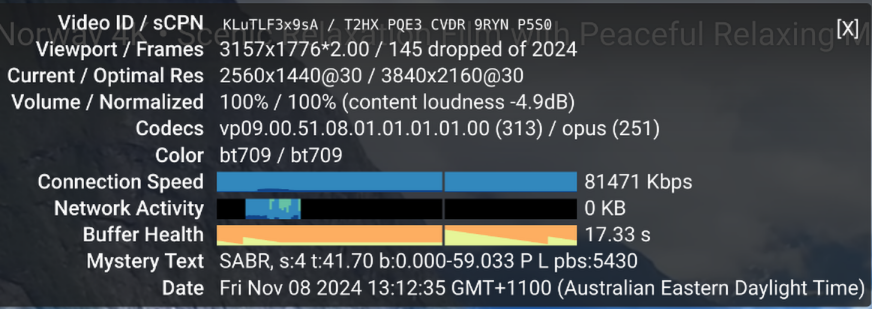
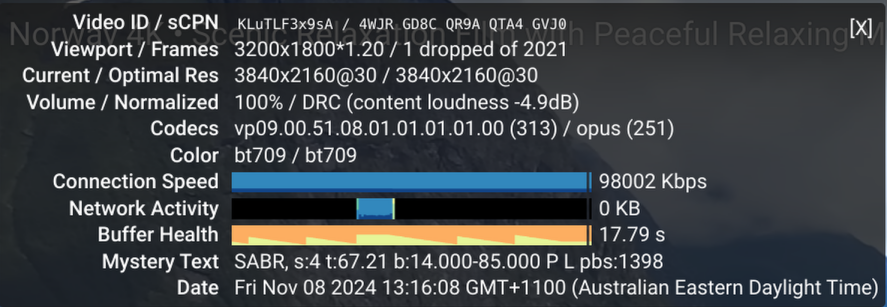
During what I assume are high bitrate sections of YouTube videos (e.g. lots of movement, high resolution) YouTube will constantly drop frames. Video for example: https://www.youtube.com/watch?v=KLuTLF3x9sA I have tried: • Safe Mode • Installing the Flatpak and testing in that, which also has a fresh profile as I don't use the Flatpak version • Testing different related about:config settings – I can't remember them all now, but I tested every one I found googling that is related to the issue or hardware acceleration. Hardware acceleration is for sure working. Turning it off makes the video drop to one or two FPS. Chromium has no problem with the same video. However, you can see from the screenshots that both read the resolution/scaling of my screen differently, and it implies that Firefox is rendering something like 6314 x 3552 while Chromium is rendering at UHD, the resolution of the screen and my video. If I turn off all my Global Scaling, Firefox stops dropping frames (the same info box on YouTube states resolution is UHD), reinforcing my theory about scaling being the issue. Both are confirmed to be using native Wayland.
Foto të bashkëngjitura ekrani

Zgjidhje e zgjedhur

The solution is to set widget.wayland.fractional-scale.enabled to true

Lexojeni këtë përgjigje brenda kontekstit 👍 1

Krejt Përgjigjet (1)

more options

Zgjidhja e Zgjedhur

The solution is to set widget.wayland.fractional-scale.enabled to true