


Windows 10 reached EOS (end of support) on October 14, 2025. If you are on Windows 10, see this article.

Kërkoni te Asistenca

Shmangni karremëzime gjoja asistence. S’do t’ju kërkojmë kurrë të bëni një thirrje apo të dërgoni tekst te një numër telefoni, apo të na jepni të dhëna personale. Ju lutemi, raportoni veprimtari të dyshimtë duke përdorur mundësinë “Raportoni Abuzim”.

Mësoni Më Tepër

Use of Apple app-specific password causing problems

  • 3 përgjigje
  • 0 e kanë hasur këtë problem
  • 62 parje
  • Përgjigjja më e re nga sfhowes

I use Thunder bird v.115.8.1 64bit for sending emails. I have several accounts (gmail, apple, talktalk, etc) but the only account that has stopped working for at least a year is the Apple account. It used to be xxxxxx@me.com but now is xxxxxx@icloud.com. I have gone through the instructions both on the Apple site and on your modzilla site several time and it will not allow emails to be sent. Receiving is usually ok, but sending always ends up with messages ranging from "reenter password " to "SMTP server not recognised".

SMTP Settings are currently: email address: myname@icloud.com smtp server: smtp.mail.me.com Port: 587 Connection: SSL/TLS Authentication method:Password User name: myname@icloud.com

IMAP imap.mail.me.com Port:993 Connection: SSL/TLS Authentication method:Password

I suspect it may be the app-specific password that is to blame but it is not possible to check in Apple's site. You can only replace the password and write it down. However the pw is displayed when you check the saved passwords in Thunderbird which I have verified.

Any thoughts?
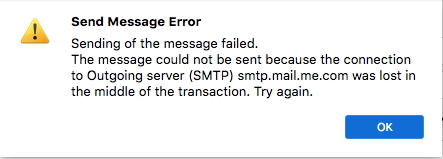
I use Thunder bird v.115.8.1 64bit for sending emails. I have several accounts (gmail, apple, talktalk, etc) but the only account that has stopped working for at least a year is the Apple account. It used to be xxxxxx@me.com but now is xxxxxx@icloud.com. I have gone through the instructions both on the Apple site and on your modzilla site several time and it will not allow emails to be sent. Receiving is usually ok, but sending always ends up with messages ranging from "reenter password " to "SMTP server not recognised". SMTP Settings are currently: email address: myname@icloud.com smtp server: smtp.mail.me.com Port: 587 Connection: SSL/TLS Authentication method:Password User name: myname@icloud.com IMAP imap.mail.me.com Port:993 Connection: SSL/TLS Authentication method:Password I suspect it may be the app-specific password that is to blame but it is not possible to check in Apple's site. You can only replace the password and write it down. However the pw is displayed when you check the saved passwords in Thunderbird which I have verified. Any thoughts?
Foto të bashkëngjitura ekrani

Krejt Përgjigjet (3)

Does it make any difference if the outgoing security is STARTTLS on 587?

https://support.apple.com/en-ca/102525

It’s not working with any combination of port and authorisation. I’ve spent months trying.

What is the antivirus, or VPN, if in use? Try with OS X in safe mode to bypass startup apps.

https://support.apple.com/en-ca/guide/mac-help/mh21245/mac