


Can't use Provider for Google Agenda
Hi,
I want to sync with read-write access to my Google Agenda on Thunderbird. I already have a Google mail account set up, works fine. I followed the steps on the blog post by downloading and installing the Provider add-on.
When I go to add a Google Agenda, I enter my email account and a popup opens and closes immediately (the popup asking me to log into my account I imagine).
See the screenshot attached as I managed to take a picture right as the popup appears and disappears immediately.

Zgjidhja e Zgjedhur
Provider literally just got a new version 102.0.3 over the weekend.
Krejt Përgjigjet (9)
Instead of using the add-on, try the built-in CalDAV option: File/New/Calendar... On the Network...enter the gmail address (location is autodetected)... enter the account password in the OAuth window to allow access.
Yeah I saw that, it works but I don't get tasks that way.
レオン said
Yeah I saw that, it works but I don't get tasks that way.
And issues with the provider are a support issue for the author. Perhap0s use the link on the providers download page.
Using 102.4.2 I set up the gmail Calendar using built-in CalDAV option I have addon 'Provider for Google Calendar' version 102.0.0 I can access gmail 'My Tasks'.
All working ok for me. Try - uninstall addon and then get a fresh install: https://addons.thunderbird.net/en-GB/thunderbird/addon/provider-for-google-calendar/
Toad-Hall a écrit
Using 102.4.2 I set up the gmail Calendar using built-in CalDAV option I have addon 'Provider for Google Calendar' version 102.0.0 I can access gmail 'My Tasks'. All working ok for me. Try - uninstall addon and then get a fresh install: https://addons.thunderbird.net/en-GB/thunderbird/addon/provider-for-google-calendar/
Weird, cause like I said I did try that at first but I don't get tasks at all that way. See picture attached.
I'll just go ask support on the add-on page.
EDIT : this is a known issue, if you don't have it it's because you haven't logged out to log back in https://github.com/kewisch/gdata-provider/discussions/519
I'll marked the topic as closed since it's on the add-on side.
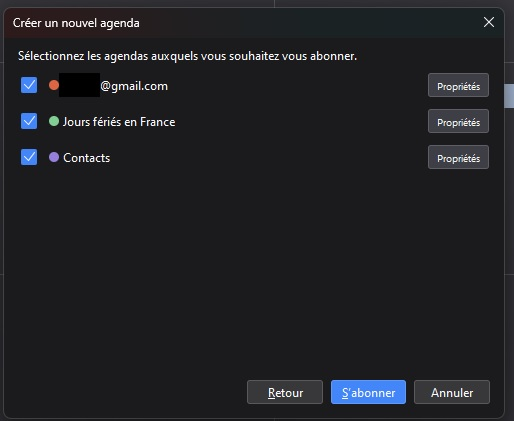
Ndryshuar nga RiceboySleeps
EDIT : double post
Ndryshuar nga RiceboySleeps
Toad-Hall a écrit
Using 102.4.2 I set up the gmail Calendar using built-in CalDAV option I have addon 'Provider for Google Calendar' version 102.0.0 I can access gmail 'My Tasks'. All working ok for me. Try - uninstall addon and then get a fresh install: https://addons.thunderbird.net/en-GB/thunderbird/addon/provider-for-google-calendar/
What you're describing is simply adding a Google Calendar using the buil-in CalDAV support from Thunderbird. If you completely remove the add-on, and add a network calendar you'll end up having everything but tasks. So you probably added one using the third option, Google Calendar, which only appears when you have the Provider add-on.
See screenshot attached of me adding a network calendar, as you'll see there are no tasks to sync at all. Anyway, the login issue is a known issue and the author of the add-on needs to update it with Google Oauth2.0 support : https://github.com/kewisch/gdata-provider/discussions/519
Anyway, this thread can be closed since it's not TB dependant.
Thank you.
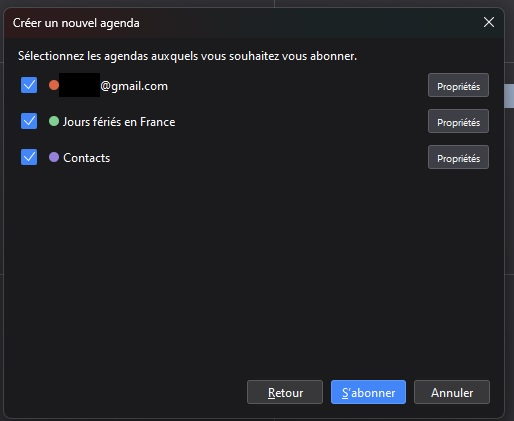
Ndryshuar nga RiceboySleeps
Zgjidhja e Zgjedhur
Provider literally just got a new version 102.0.3 over the weekend.