Kjo rrjedhë është arkivuar.
Ju lutemi, bëni një pyetje të re, nëse keni nevojë për ndihmë.

Arkivuar
2 tool bars
I have 2 search tool bars one on top of the other at the top of every page. I only have google for a search engine. I would like to get rid of one of these bars. Any suggestion? I am not a programmer. They are confusing me. The top bar says "new...get...search" The second bar down has a back arrow, forward arrow, a circle, (marshall's) shield and a box with a circle on top (a man?). Thks for hlp. Ani Ana
I have 2 search tool bars one on top of the other at the top of every page. I only have google for a search engine. I would like to get rid of one of these bars. Any suggestion? I am not a programmer. They are confusing me. The top bar says "new...get...search" The second bar down has a back arrow, forward arrow, a circle, (marshall's) shield and a box with a circle on top (a man?). Thks for hlp. Ani Ana
Krejt Përgjigjet (1)
- Click the menu button
 , click More Tools… and choose Customize Toolbar….
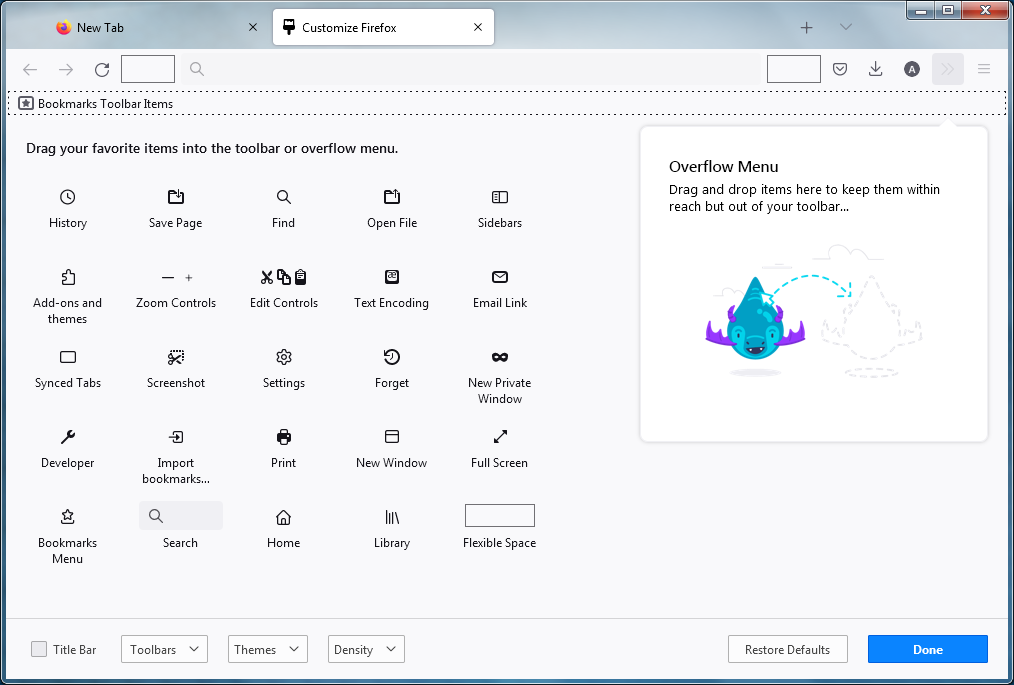
- A special tab will open which allows you to drag and drop items in or out of the overflow menu and the toolbar.
- Click the Restore Defaults button at the bottom of the screen.
- When you are done, click the Done button.