


Caldev Calendar Suddenly Requiring User Name and Password
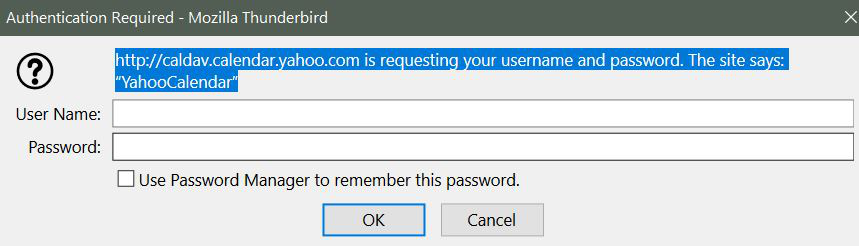
Last night I opened Thunderbird and had a forced request to sign in to the caldev calendar. I don't know why it suddenly popped up, but I cannot get past the screen to make and settings adjustments. I tried my Thunderbird credentials to login, but they don't work.
Note that I use Yahoo mail and I am able to signin to yahoo directly and use my email account.
How to I resolve this error? The attachment shows the error.
Krejt Përgjigjet (4)
Please, I'm hoping someone can help with this issue. I am able to use yahoo mail, so I can access my mail. However all my folders are tied to Thunderbird and I cannot access them. In fact I can't access anything in Thunderbird, as the caldev password request shown on the screenshot comes up first, can't be cancelled or cleared from the screen. I updated from 78.12.0 to 78.11.0, but still get the caldev password request. Note that neither the Thunderbird nor my Yahoo account User Id's and passwords work for logging in.
Ndryshuar nga Jeff
well I cancel the yahoo calendar request I receive. SO what could be different with your setup. The dialog has a cancel button that is enabled.
I can hit cancel a million times, it is enabled, but it does not work. The caldev screen blinks off and then right back on. I cannot get past the Caldev screen to do anything. I have to shutdown Thunderbird via Task Manager.
I can uninstall Thunderbird and then I am able to set it up for email and do other functions. As soon as I close it and reopen the Caldev error pops up.
I shut down my Internet security, Bitdefender, to see if it was blocking the program, but it wasn't.
I have installed the last 2 releases to see if they made a difference - no difference.
Ndryshuar nga Jeff
Can anyone help here. I'm really stuck for a solution. Is there a way to export or import my local folders and calendar to gmail or another mail program in the meantime? A question, when I setup my "email" address and password for yahoo after a fresh start/full uninstall and reinstall, what should the settings be - I keep my mail folders locally in appdata - roaming - profiles.